
MCP Weather Server
A streamable HTTP MCP (Model Context Protocol) server for getting weather data via the Open-Meteo API.
🚀 Features
- Streamable HTTP Transport: Compatible with MCP 2025-03-26 specification
- Session Management: Support for persistent sessions with unique IDs
- Weather Tools: Three main tools for geolocation and weather data
- REST API: Health endpoint for monitoring
- Kubernetes Ready: Docker containerization and K8s deployment manifests
- Local City Search: CSV-based local city database for offline search
📁 Project Structure
├── src/                           # Source code TypeScript
├── build/                         # Compiled JavaScript
├── static/                        # CSV city data files
├── test/                          # Test scripts and examples
│   ├── test-k8s-deployment.sh     # Kubernetes deployment tests
│   ├── test_mcp.js               # MCP functionality tests
│   ├── example-client.js         # Example MCP client
│   └── README.md                 # Test documentation
├── claude-configuration/          # Claude Desktop configuration
│   ├── claude_config*.json       # Various Claude configs
│   ├── install_claude_config.sh  # Auto-installation script
│   └── README.md                 # Configuration guide
├── k8s/                          # Kubernetes manifests
│   ├── deployment.yaml           # K8s deployment
│   ├── service.yaml              # K8s service
│   └── ingress.yaml              # K8s ingress
├── Dockerfile                    # Multi-stage Docker build
├── k8s-all-in-one.yaml          # Complete K8s deployment
├── build-deploy-container.sh                     # Automated deployment script
└── KUBERNETES_DEPLOYMENT.md     # Kubernetes deployment guide
📦 Requirement
cd flowise/kubernetes
MINIP=`minikube ip`
sed -i "s/CHANGEME/$MINIP/g" ingress-flowise.yaml
kubectl apply -f .
You need to import on flowise a new agent "Agentflows"
📦 Installation
# Clone and install dependencies
npm install

# Compile TypeScript
npm run build

# Start the server
npm start
🔧 Configuration
The server uses the following environment variables:
PORT: Listening port (default: 3000)
Example:
PORT=8080 npm start
🛠️ Available MCP Tools
1. search_location
Search for GPS coordinates of a city or location by name using the Open-Meteo geocoding API.
Parameters:
city_name(string): Name of the city or location to search forcountry(string, optional): Country name to narrow the searchlimit(number, optional): Maximum number of results to return (default: 5, max: 10)
Example response:
{
  "query": "Paris",
  "country_filter": null,
  "total_results": 5,
  "locations": [
    {
      "name": "Paris",
      "country": "France",
      "admin1": "Île-de-France",
      "latitude": 48.8566,
      "longitude": 2.3522,
      "timezone": "Europe/Paris",
      "population": 2161000,
      "elevation": 42
    },
    {
      "name": "Paris",
      "country": "United States",
      "admin1": "Texas",
      "latitude": 33.6609,
      "longitude": -95.5555,
      "timezone": "America/Chicago",
      "population": 25171,
      "elevation": 177
    }
  ]
}
2. search_local_cities
Search for cities in the local CSV database for offline functionality and faster local search.
Parameters:
city_name(string): Name of the city to search for (case insensitive partial match)exact_match(boolean, optional): Whether to search for exact match or partial match (default: false)limit(number, optional): Maximum number of results to return (default: 10, max: 50)
Example response:
{
  "query": "Paris",
  "exact_match": false,
  "total_found": 3,
  "results_returned": 3,
  "cities": [
    {
      "name": "Paris",
      "latitude": 48.8566,
      "longitude": 2.3522
    },
    {
      "name": "Paris-15e-Arrondissement",
      "latitude": 48.8421,
      "longitude": 2.3008
    },
    {
      "name": "Parisot",
      "latitude": 44.0625,
      "longitude": 1.7125
    }
  ]
}
3. get_weather
Get current weather information for a location.
Parameters:
latitude(number): Latitude in decimal degrees (-90 to 90)longitude(number): Longitude in decimal degrees (-180 to 180)location_name(string, optional): Optional location name for display
Example response:
{
  "location": "Paris",
  "weather": {
    "current_weather": {
      "temperature": 15.2,
      "windspeed": 10.5,
      "winddirection": 230,
      "weathercode": 1,
      "is_day": 1,
      "time": "2024-01-15T14:00"
    },
    "current_units": {
      "temperature": "°C",
      "windspeed": "km/h",
      "winddirection": "°",
      "weathercode": "wmo code",
      "is_day": "",
      "time": "iso8601"
    }
  },
  "lastUpdate": "2024-01-15T14:05:30.123Z"
}
4. stream_weather
Start streaming weather data with periodic updates.
Parameters:
latitude(number): Latitude in decimal degrees (-90 to 90)longitude(number): Longitude in decimal degrees (-180 to 180)location_name(string, optional): Optional location name for displayinterval_seconds(number, default: 60): Update interval in seconds
🌐 HTTP Endpoints
Server Health
GET /health
Returns server status:
{
  "status": "OK",
  "timestamp": "2024-01-15T14:05:30.123Z"
}
MCP Endpoint
POST /mcp
GET /mcp
DELETE /mcp
Main endpoint for MCP communications. Supports:
POST: Initialization and request sendingGET: SSE stream establishment for responsesDELETE: Session termination
📋 Usage Example with MCP Client
1. Session Initialization
const initRequest = {
  jsonrpc: '2.0',
  id: 1,
  method: 'initialize',
  params: {
    protocolVersion: '2024-11-05',
    capabilities: { tools: {} },
    clientInfo: { name: 'weather-client', version: '1.0.0' }
  }
};

const response = await fetch('http://localhost:8080/mcp', {
  method: 'POST',
  headers: {
    'Content-Type': 'application/json',
    'Accept': 'application/json, text/event-stream'
  },
  body: JSON.stringify(initRequest)
});

const sessionId = response.headers.get('mcp-session-id');
2. List Available Tools
const listToolsRequest = {
  jsonrpc: '2.0',
  id: 2,
  method: 'tools/list',
  params: {}
};

const response = await fetch('http://localhost:8080/mcp', {
  method: 'POST',
  headers: {
    'Content-Type': 'application/json',
    'Accept': 'application/json, text/event-stream',
    'mcp-session-id': sessionId
  },
  body: JSON.stringify(listToolsRequest)
});
3. Call Weather Tool
const weatherRequest = {
  jsonrpc: '2.0',
  id: 3,
  method: 'tools/call',
  params: {
    name: 'get_weather',
    arguments: {
      latitude: 48.8566,
      longitude: 2.3522,
      location_name: 'Paris'
    }
  }
};

const response = await fetch('http://localhost:8080/mcp', {
  method: 'POST',
  headers: {
    'Content-Type': 'application/json',
    'Accept': 'application/json, text/event-stream',
    'mcp-session-id': sessionId
  },
  body: JSON.stringify(weatherRequest)
});
🧪 Testing
Quick Testing
# Start the server
PORT=8080 npm start

# Test the health endpoint
curl http://localhost:8080/health
Comprehensive Testing
The project includes various test scripts organized in the test/ directory:
# Run MCP functionality tests
cd test && node test_mcp.js

# Test local city search
cd test && node test_local_cities.js

# Test location search
cd test && node test_search_location.js

# Test Kubernetes deployment (requires K8s cluster)
./test/test-k8s-deployment.sh
For more testing options, see test/README.md.
🐳 Container Build & Kubernetes Deployment
This section describes how to containerize the MCP Weather Sample application and deploy it to a Kubernetes cluster.
📦 Containerization Overview
The application uses a multi-stage Docker build approach for optimal production deployment:
- Build Stage: Compiles TypeScript source code
- Production Stage: Creates minimal runtime image with only production dependencies
- Security: Runs as non-root user with minimal privileges
- Health Checks: Built-in container health monitoring
🏗️ Docker Build Process
Automated Build & Deployment
# Complete build and deployment pipeline
./build-deploy-container.sh all

# Individual steps
./build-deploy-container.sh build    # Build Docker image only
./build-deploy-container.sh deploy   # Deploy to Kubernetes only
./build-deploy-container.sh cleanup  # Remove deployment
Manual Docker Operations
# Build the Docker image
docker build -t mcp-weather-sample:latest .

# Run container locally for testing
docker run -p 8080:8080 mcp-weather-sample:latest

# Check container health
curl http://localhost:8080/health

# View container logs
docker logs <container-id>
Docker Image Details
- Base Image:
node:20-alpine(lightweight Linux distribution) - Final Size: ~150MB (optimized with multi-stage build)
- Port: 8080 (configurable via
PORTenvironment variable) - Health Check: Built-in HTTP health endpoint monitoring
- User: Non-root user (
nextjs:nodejs) for security
⚓ Kubernetes Deployment Architecture
Deployment Components
The Kubernetes deployment includes:
- Deployment: 3 replicas with rolling updates
- Service: ClusterIP service exposing port 80→8080
- ConfigMap: Environment configuration management
- Ingress: External traffic routing with CORS support
- Health Probes: Startup, liveness, and readiness checks
Resource Configuration
resources:
  requests:
    memory: "128Mi"    # Minimum memory allocation
    cpu: "100m"        # Minimum CPU allocation (0.1 core)
  limits:
    memory: "512Mi"    # Maximum memory limit
    cpu: "500m"        # Maximum CPU limit (0.5 core)
High Availability Features
- 3 Replicas: Ensures service availability during pod failures
- Rolling Updates: Zero-downtime deployments
- Health Checks: Automatic pod restart on failure
- Resource Limits: Prevents resource exhaustion
- CORS Configuration: Proper header handling for MCP sessions
🚀 Deployment Options
Option 1: All-in-One Deployment
# Deploy everything with single command
kubectl apply -f k8s-all-in-one.yaml

# Monitor deployment progress
kubectl rollout status deployment/mcp-weather-app

# Check pod status
kubectl get pods -l app=mcp-weather-app
Option 2: Component-by-Component
# Deploy individual components
kubectl apply -f k8s/configmap.yaml
kubectl apply -f k8s/deployment.yaml
kubectl apply -f k8s/service.yaml
kubectl apply -f k8s/ingress.yaml
Option 3: Automated Script
# Use the provided deployment script
./build-deploy-container.sh all

# Script features:
# - Validates kubectl connectivity
# - Builds Docker image
# - Applies Kubernetes manifests
# - Waits for deployment readiness
# - Provides access instructions
🔧 Configuration Management
Environment Variables
Configure the application through the ConfigMap:
apiVersion: v1
kind: ConfigMap
metadata:
  name: mcp-weather-config
data:
  NODE_ENV: "production"
  PORT: "8080"
  LOG_LEVEL: "info"
Ingress Configuration
# Custom domain configuration
spec:
  rules:
  - host: mcp-weather.your-domain.com  # Replace with your domain
    http:
      paths:
      - path: /
        pathType: Prefix
        backend:
          service:
            name: mcp-weather-service
            port:
              number: 80
🧪 Testing Deployment
Quick Validation
# Test deployment health
./test/test-k8s-deployment.sh

# Manual health check via port-forward
kubectl port-forward service/mcp-weather-service 8080:8080
curl http://localhost:8080/health

# Debug
kubectl exec -it pods/$(kubectl get pods  --no-headers -o custom-columns=":metadata.name" | grep 'flowise'|head -1) sh
Comprehensive Testing
# Test all endpoints and functionality
./test/test-k8s-deployment.sh local

# Test via ingress (requires domain configuration)
./test/test-k8s-deployment.sh ingress your-domain.com
📊 Monitoring & Troubleshooting
Checking Deployment Status
# Pod status and logs
kubectl get pods -l app=mcp-weather-app
kubectl logs -l app=mcp-weather-app -f

# Service endpoints
kubectl get endpoints mcp-weather-service
kubectl describe service mcp-weather-service

# Ingress status
kubectl get ingress mcp-weather-ingress
kubectl describe ingress mcp-weather-ingress
Common Troubleshooting
# Pod not starting
kubectl describe pod <pod-name>
kubectl logs <pod-name> --previous

# Service not accessible
kubectl port-forward service/mcp-weather-service 8080:80
curl http://localhost:8080/health

# Image pull issues
kubectl describe pod <pod-name> | grep -A 5 "Events:"
🔄 Scaling & Updates
Horizontal Scaling
# Scale to 5 replicas
kubectl scale deployment mcp-weather-app --replicas=5

# Verify scaling
kubectl get pods -l app=mcp-weather-app
Rolling Updates
# Update image version
kubectl set image deployment/mcp-weather-app \
  mcp-weather-app=mcp-weather-sample:v2.0.0

# Monitor rollout
kubectl rollout status deployment/mcp-weather-app

# Rollback if needed
kubectl rollout undo deployment/mcp-weather-app
For complete deployment instructions and advanced configurations, see KUBERNETES_DEPLOYMENT.md.
⚙️ Claude Desktop Integration
The project includes pre-configured Claude Desktop configurations in the claude-configuration/ directory:
# Auto-install Claude configuration
cd claude-configuration && ./install_claude_config.sh

# Validate HTTP configuration
cd claude-configuration && ./validate_claude_http.sh
Available configurations:
- Basic:
claude_config.json- Minimal setup - Detailed:
claude_config_detailed.json- Full options - HTTP:
claude_config_http.json- HTTP transport specific
For detailed setup instructions, see claude-configuration/README.md.
🔍 Using MCP Inspector
You can use the official MCP Inspector to visually explore and test your weather server tools in a user-friendly interface.
Installation and Setup
-
Install MCP Inspector (requires Node.js):
npx @modelcontextprotocol/inspector -
Start your weather server:
PORT=8080 npm start -
Configure MCP Inspector:
- Server URL:
http://localhost:8080/mcp - Transport:
HTTP (Streamable) - Protocol Version:
2024-11-05
- Server URL:
Visual Interface Features
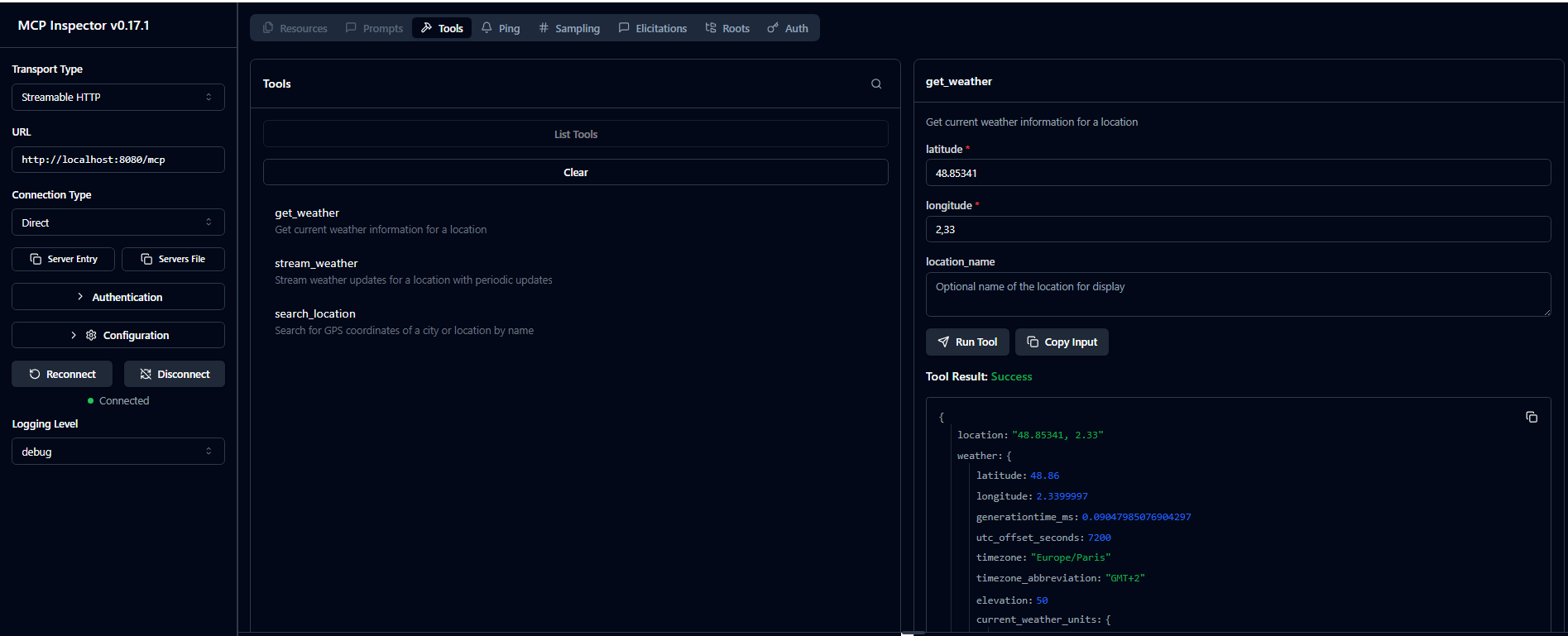
The MCP Inspector provides:
- 🛠️ Tools Explorer: Browse all available tools (
search_location,get_weather,stream_weather) - 📝 Interactive Forms: Easy-to-use forms for entering tool parameters
- 🎯 Real-time Testing: Execute tools and see live responses
- 📊 Response Viewer: JSON-formatted results with syntax highlighting
- 🔄 Session Management: Visual session state and connection status
- 📈 Request/Response History: Track all your API interactions
Example Workflow
- Connect to your server using the Inspector
- Explore the three available weather tools
- Test location search:
- Tool:
search_location - Parameters:
city_name: "Paris"
- Tool:
- Get weather data:
- Tool:
get_weather - Parameters: Use coordinates from previous search
- Tool:
- Monitor streaming:
- Tool:
stream_weather - Watch real-time weather updates
- Tool:
Benefits
- No coding required: Test your MCP server without writing client code
- Visual debugging: See exactly what data flows between client and server
- Tool validation: Verify parameter schemas and response formats
- Rapid prototyping: Quickly iterate on your MCP server implementation
The Inspector is particularly useful during development to ensure your weather server works correctly before integrating it into larger applications.
🏗️ Architecture
- Express.js: HTTP server
- MCP SDK: MCP protocol implementation with StreamableHTTPServerTransport
- Open-Meteo API: Weather data source
- TypeScript: Development language with compilation to JavaScript
Integrate MCP server on flowise (lowcode GenAI tool)
-
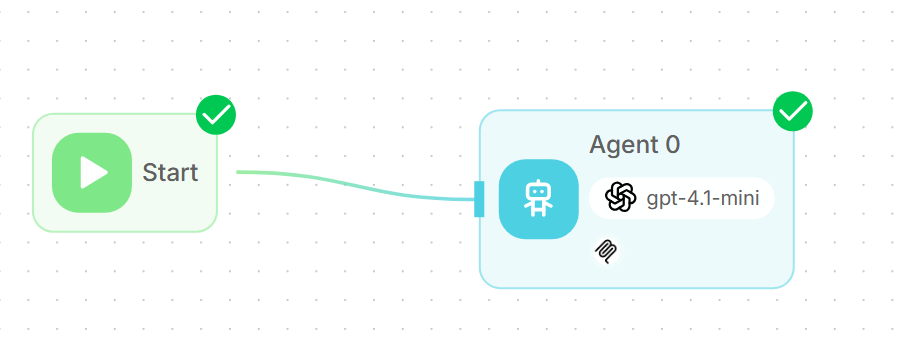
On flowise initialise an agentflow
-
Retrieve MCP configuration through MCP inspector
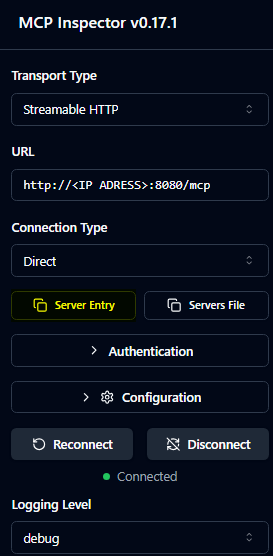 Copy/Paste form "Server Entry" on Inspector interface
 -
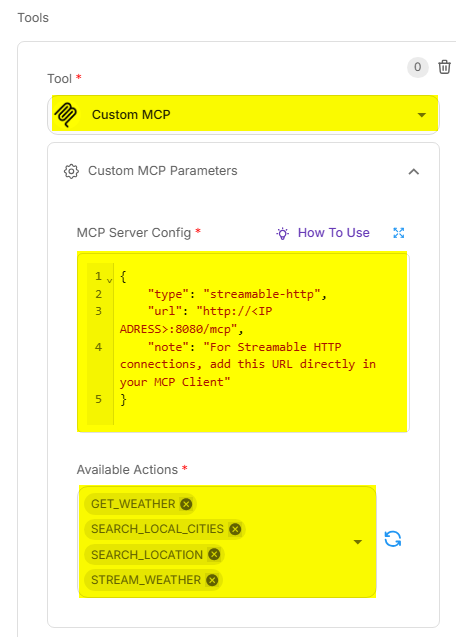
Configure a "MCP Custom" tool and add exposed toolexposed by the MCP server on flowise add MCP configuration specifciation copied from Inspector
📄 Specifications
- MCP Protocol: Version 2024-11-05 and 2025-03-26
- Transport: Streamable HTTP with SSE support
- Data Format: JSON-RPC 2.0
- Weather API: Open-Meteo
🔗 Useful Links
📝 License
This project is a demonstration example based on open-meteo-mcp.