
🏢Enterprise Expense Automation System using MCP & NLP



A professional Model Context Protocol (MCP) server for tracking company expenses, employees, departments, and performance through natural language conversations with Claude Desktop.
✨ Features
- 12 MCP Tools for complete CRUD operations
- Natural Language Interface through Claude Desktop chatbot
- Employee Management with unique employee numbers (EMP0001, EMP0002, etc.)
- Expense Tracking with categorization and department assignment
- Performance Management with ratings and comments
- AI-Powered Analysis using Google Gemini 2.0 Flash (Latest 2025 Model)
- Duplicate Detection and automatic cleanup
- Safe Delete Operations with cascade support
🏗️ System Architecture
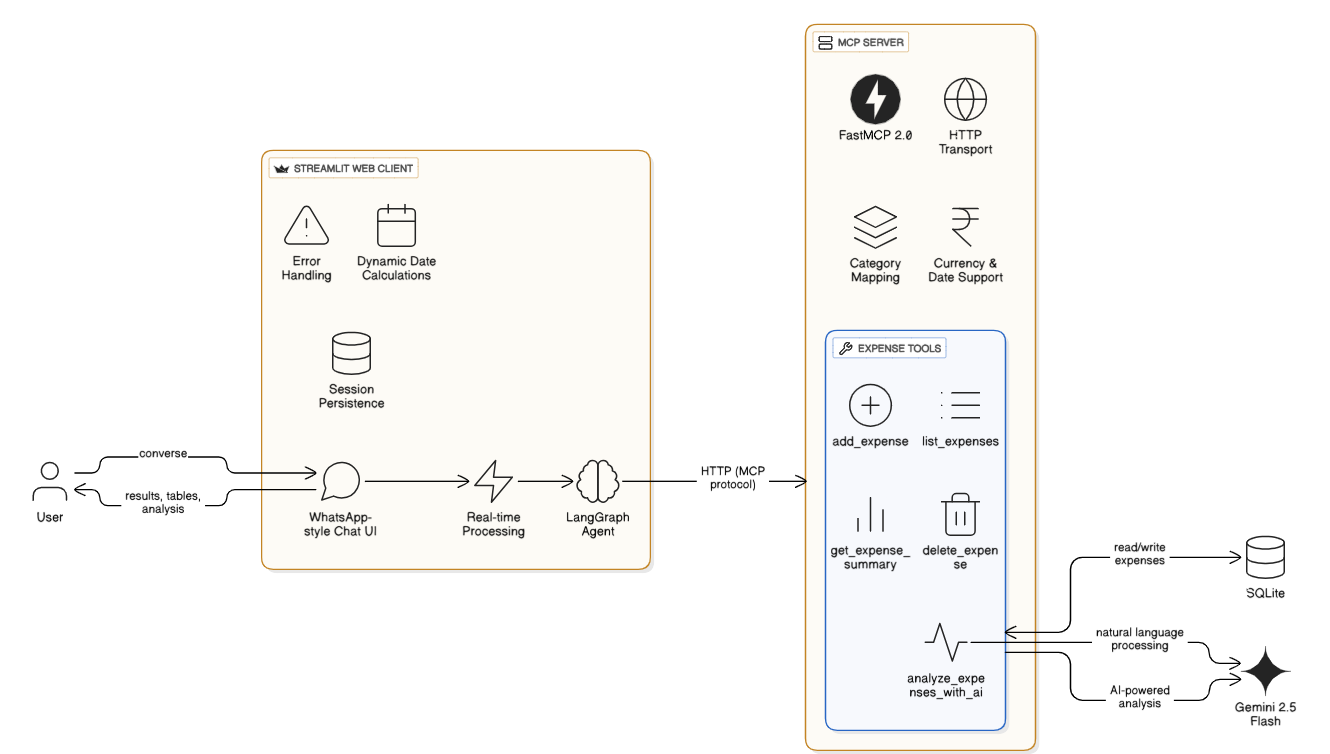
The architecture shows the complete flow from Claude Desktop through the MCP Server to the SQLite database, with AI-powered analysis via Google Gemini.
📊 Database Schema
departments         employees              expenses              performance
├── id             ├── id                 ├── id                ├── id
├── name           ├── employee_number    ├── date              ├── employee_id
└── description    ├── name               ├── amount            ├── rating
                   ├── role               ├── category          ├── month
                   ├── department_id      ├── note              └── comments
                   ├── salary             └── department_id
                   └── join_date
Current Data:
- 4 Departments (Admin, HR, Tech, BPO)
- 18 Employees with unique employee numbers
- 34 Expense records
- 20 Performance ratings
🚀 Quick Start
Prerequisites
- Python 3.11 or higher
- UV package manager or pip
- Claude Desktop application
- Google Gemini API key
Installation
- Create virtual environment
cd "C:\Users\VH0000812\Desktop\Expense Tracker"
uv venv
.\.venv\Scripts\activate
- Install dependencies
uv pip install -r requirements.txt
- Set up environment variables
Create .env file:
GEMINI_API_KEY=your_google_gemini_api_key_here
- Initialize database with sample data
python scripts\populate_data.py
- Configure Claude Desktop
Add to %APPDATA%\Claude\claude_desktop_config.json:
{
  "mcpServers": {
    "company-expense-tracker": {
      "command": "C:\\Users\\VH0000812\\Desktop\\Expense Tracker\\.venv\\Scripts\\python.exe",
      "args": [
        "C:\\Users\\VH0000812\\Desktop\\Expense Tracker\\main.py"
      ],
      "env": {
        "GEMINI_API_KEY": "your_api_key_here"
      }
    }
  }
}
- Restart Claude Desktop
🛠️ MCP Tools (12 Total)
➕ Create Operations (4)
| Tool | Description | Example |
|---|---|---|
add_department | Create new departments | "Create Marketing department" |
add_employee | Add employees with auto employee numbers | "Hire John as Developer in Tech at $100k" |
add_expense | Track expenses by department | "Add $500 AWS expense to Tech" |
add_performance | Add performance ratings | "Give Alice 5 stars this month" |
🗑️ Delete Operations (4)
| Tool | Description | Example |
|---|---|---|
delete_employee | Remove employees by number/name | "Delete employee EMP0015" |
delete_expense | Delete expense records | "Delete expense ID 45" |
delete_department | Remove departments (force mode available) | "Force delete Marketing with all data" |
delete_duplicate_employees | Auto-detect and remove duplicates | "Remove all duplicate employees" |
📋 Query Operations (3)
| Tool | Description | Example |
|---|---|---|
list_employees | View employees (all or by department) | "Show all HR employees" |
list_expenses | List expenses with filters | "Show Tech expenses last 30 days" |
get_department_summary | Comprehensive department stats | "Give me HR summary" |
🤖 AI Analysis (1)
| Tool | Description | Example |
|---|---|---|
analyze_company_with_ai | AI-powered insights via Gemini | "Which department spends most?" |
💬 Usage Examples
Employee Management
✅ "Hire Sarah as Marketing Manager in Admin at $75,000"
✅ "Show me all Tech department employees"
✅ "Delete employee EMP0017"
✅ "Find and remove all duplicate employees"
Expense Tracking
✅ "Add $1,500 office furniture expense to Admin"
✅ "Show all expenses from last month"
✅ "Delete expense ID 32"
Performance & Analysis
✅ "Give John Smith a 5-star rating with comment 'Excellent work'"
✅ "Show me complete HR department summary"
✅ "Which department has highest salary burden?"
✅ "Analyze expense trends across departments"
📁 Project Structure
Expense Tracker/
├── src/                      # Source code modules
│   ├── operations/           # Business logic
│   ├── ai/                   # AI integration
│   ├── tools/                # MCP tool definitions
│   ├── database.py           # Database config
│   └── __init__.py
├── tests/                    # All test files
│   ├── test_tools.py
│   ├── test_delete_functions.py
│   └── test_employee_numbers.py
├── scripts/                  # Utility scripts
│   ├── populate_data.py      # Initialize data
│   ├── migrate_employee_numbers.py
│   └── db_viewer.py          # Interactive viewer
├── docs/                     # Documentation
│   ├── QUICK_REFERENCE.md
│   ├── DELETE_TOOLS.md
│   └── COMPLETE_SUMMARY.md
├── config/                   # Configuration
│   └── departments.json
├── data/                     # Database
│   └── company.db
├── main.py                   # Entry point
├── requirements.txt
├── .env
├── .gitignore
└── README.md
🧪 Testing
Run tests:
python tests\test_tools.py
python tests\test_delete_functions.py
python tests\test_employee_numbers.py
Interactive database viewer:
python scripts\db_viewer.py
🔧 Configuration
Expense Categories
- Infrastructure, Software Licenses, Training
- Office Supplies, Utilities, Salaries
- Recruitment, Events, Equipment, Maintenance
Employee Number Format
- Auto-generated:
EMP0001,EMP0002, etc. - Unique identifier for each employee
- Used for quick lookups and operations
🔒 Security Features
- ✅ API keys in environment variables
- ✅ Foreign key constraints in database
- ✅ Input validation on all operations
- ✅ Safe delete mode (force flag required for cascade)
- ✅ Duplicate detection and prevention
🆘 Troubleshooting
Claude Desktop not showing tools
- Restart Claude Desktop (right-click tray icon → Quit)
- Check config path in
claude_desktop_config.json - Verify database exists at
data/company.db
Database errors
# Migrate employee numbers
python scripts\migrate_employee_numbers.py

# Reinitialize database
python scripts\populate_data.py
Import errors
# Reinstall dependencies
uv pip install -r requirements.txt

# Check Python version (must be 3.11+)
python --version
📚 Documentation
- Quick Reference:
docs/QUICK_REFERENCE.md - Complete Summary:
docs/COMPLETE_SUMMARY.md - Delete Tools Guide:
docs/DELETE_TOOLS.md - Getting Started:
docs/GETTING_STARTED.md
🎯 Roadmap
- Update/edit operations for employees and expenses
- Bulk import/export functionality
- Monthly and yearly report generation
- Budget tracking with alerts
- Employee search by skills/role
- Expense approval workflow
- Department budget management
- API endpoint version
📈 Statistics
🏢 Departments:        4 (Admin, HR, Tech, BPO)
👥 Employees:          18 (with unique employee numbers)
💰 Total Salary:       $1,288,000 annually
💳 Expense Records:    34 tracked
⭐ Performance:        20 ratings (avg 4.2/5.0)
🤝 Development
Adding New Tools
- Define function in appropriate module
- Add MCP tool wrapper in
main.py - Test with
tests/test_*.py - Update documentation
Code Style
- Follow PEP 8 guidelines
- Use type hints
- Add docstrings to all functions
- Include error handling
📝 License
Internal use only - Company Expense Tracker
Version: 1.0.0
Last Updated: October 15, 2025
Status: ✅ Production Ready
Maintained by: Company Development Team
For support or questions, see docs/COMPLETE_SUMMARY.md