
Temporal Nexus MCP Example
A comprehensive sample application demonstrating how to bridge Model Context Protocol (MCP) tools with Temporal's Nexus RPC framework.
This calculator provides various mathematical operations through MCP, backed by the reliability and durability of Temporal workflows.
Uses a forked version of @bergundy's nexus-mcp-python, a lightweight way of adding MCP capability to Temporal Nexus Operations.
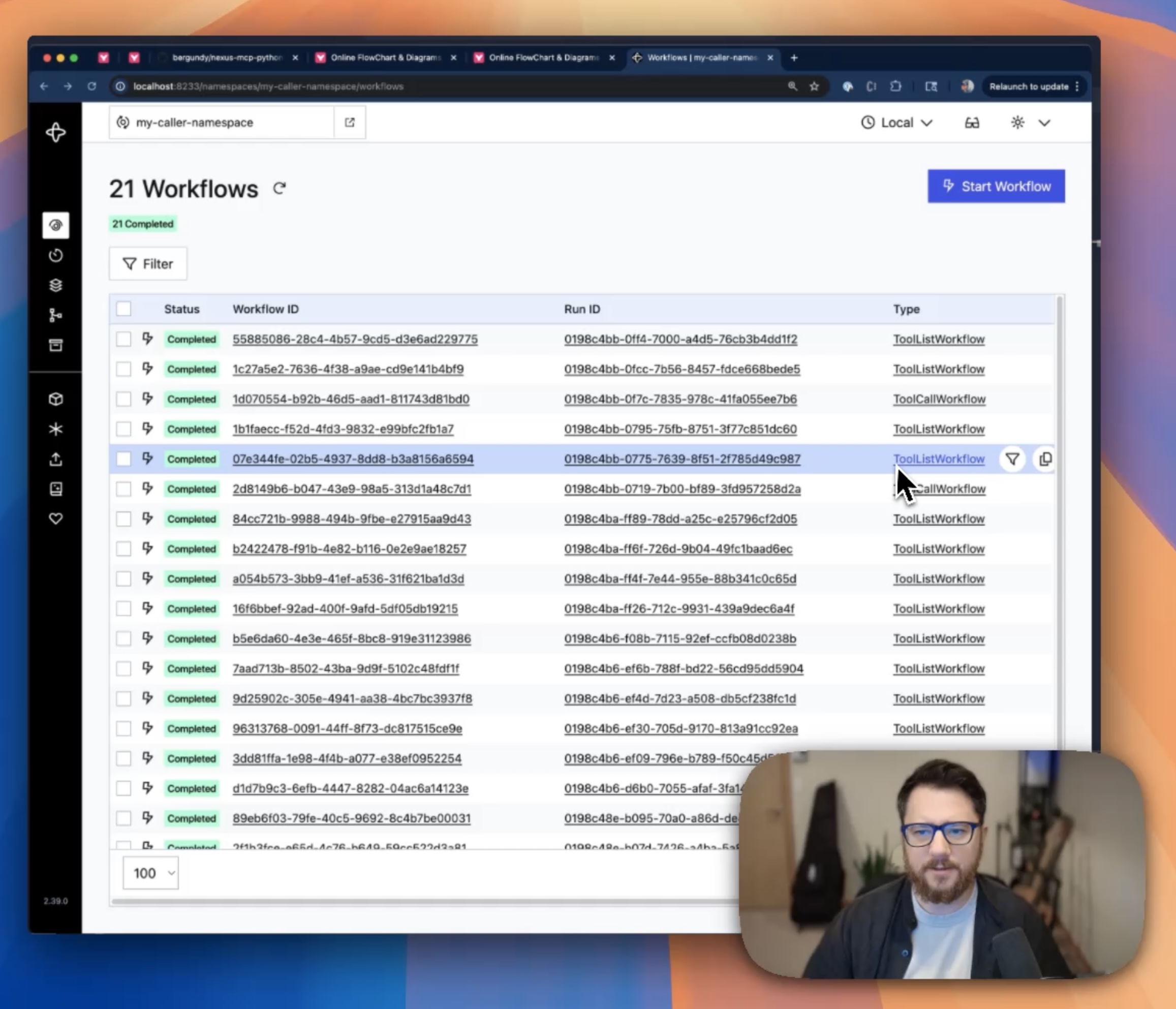 Watch the 4 minute demo to understand how interaction works.



Features
Calculator Operations
- Expression Evaluation: Safely evaluate mathematical expressions using AST parsing
- Basic Arithmetic: Add, subtract, multiply, divide operations
- Advanced Operations: Power calculations, list summation
- Built-in Functions: Support for abs, round, max, min, sum
MCP Integration
- Automatic Tool Discovery: All calculator operations exposed as MCP tools
- Type-Safe: Full Pydantic model validation
- Error Handling: Comprehensive error handling with meaningful messages
Temporal Benefits
- Reliability: Operations backed by Temporal's fault-tolerant execution
- Durability: Long-running calculations survive process restarts
- Observability: Full visibility through Temporal UI with workflow and activity executions
- Scalability: Distribute across multiple workers
- Monitoring: Each calculator operation creates visible workflow executions for easy debugging
Quick Start
Prerequisites
- Python 3.13+
- Running Temporal server (local dev server or Temporal Cloud)
- Temporal CLI installed
- Familiarity with the MCP Python SDK — this project bridges MCP to Temporal, so understanding MCP basics first will help (especially ClientSession for calling tools, and Server for exposing them)
Installation
-
Clone and set up the project:
cd nexus-mcp-calculator uv sync --dev -
Set up Temporal infrastructure:
./scripts/setup_temporal.shThis creates:
- Handler namespace (
my-handler-namespace) - where the calculator worker runs - Caller namespace (
my-caller-namespace) - where the MCP gateway runs - Nexus endpoint (
mcp-gateway) - bridges the two namespaces
- Handler namespace (
Running the Application
The application consists of two main components that need to run simultaneously:
1. Start the Calculator Worker
uv run python -m nexus_mcp_calculator.worker
This starts the Temporal worker that handles the actual calculator operations.
2. Start the MCP Server
uv run python -m nexus_mcp_calculator.mcp_server
This starts the MCP server that bridges MCP clients to the Temporal worker.
Usage Examples
Using from a Temporal Workflow
The calculator can be called from within Temporal workflows:
uv run python -m nexus_mcp_calculator.demo_workflow
This demonstrates:
- Tool discovery through MCP
- Calling calculator operations from workflows
- Handling results and errors
- Integration with Temporal's execution model
Using with MCP Clients
Claude Desktop Configuration
Add to your Claude Desktop configuration (~/Library/Application Support/Claude/claude_desktop_config.json on macOS):
{
  "globalShortcut": "",
  "mcpServers": {
    "nexus-calculator": {
      "command": "/path/to/uv",
      "args": ["run", "--directory", "/path/to/nexus-mcp-calculator", "python", "-m", "nexus_mcp_calculator.mcp_server"]
    }
  }
}
Goose Extension Configuration
Add this command: uv run --directory /path/to/sample python -m nexus_mcp_calculator.mcp_server
Available Tools
Once connected, you'll have access to these calculator tools:
calculate- Evaluate mathematical expressionsadd- Add two numberssubtract- Subtract two numbersmultiply- Multiply two numbersdivide- Divide two numberspower- Raise to a powersum_list- Sum a list of numbers
Example MCP Calls
# Expression evaluation
calculate({"expression": "2 + 3 * 4"})  # Returns: {"result": 14.0, "expression": "2 + 3 * 4"}

# Basic arithmetic
add({"a": 10, "b": 5})  # Returns: {"result": 15.0, "operation": "10.0 + 5.0 = 15.0"}

# List operations
sum_list({"numbers": [1, 2, 3, 4, 5]})  # Returns: {"result": 15.0, "operation": "sum([1, 2, 3, 4, 5]) = 15.0"}

# Advanced expressions
calculate({"expression": "abs(-10) + round(3.14159, 2)"})  # Returns: {"result": 13.14, ...}
Architecture
┌─────────────────┐    MCP Protocol    ┌──────────────────┐
│   MCP Client    │◄──────────────────►│   MCP Server     │
│ (Claude Desktop)│                    │  (mcp_server.py) │
└─────────────────┘                    └──────────────────┘
                                                │
                                                │ Temporal Client
                                                ▼
┌─────────────────────────────────────────────────────────────────┐
│                    Temporal Cluster                             │
│                                                                 │
│  ┌─────────────────┐   Nexus RPC   ┌────────────────────────────┐│
│  │ Caller Namespace│◄─────────────►│    Handler Namespace       ││
│  │                 │               │                            ││
│  │  ┌─────────────┐│               │  ┌──────────────────────┐  ││
│  │  │ MCP Gateway ││               │  │   Calculator Worker  │  ││
│  │  │  Workflow   ││               │  │                      │  ││
│  │  └─────────────┘│               │  │ ┌──────────────────┐ │  ││
│  └─────────────────┘               │  │ │ Service Handlers │ │  ││
│                                    │  │ └──────────────────┘ │  ││
│                                    │  └──────────────────────┘  ││
│                                    └────────────────────────────┘│
└─────────────────────────────────────────────────────────────────┘
Configuration
Command Line Options
Worker (worker.py)
uv run python -m nexus_mcp_calculator.worker --help

Options:
  --temporal-host TEXT    Temporal server host (default: localhost:7233)
  --namespace TEXT        Temporal namespace (default: my-handler-namespace)
  --task-queue TEXT       Task queue name (default: mcp)
MCP Server (mcp_server.py)
uv run python -m nexus_mcp_calculator.mcp_server --help

Options:
  --temporal-host TEXT    Temporal server host (default: localhost:7233)
  --namespace TEXT        Temporal namespace (default: my-caller-namespace)
  --endpoint TEXT         Nexus endpoint name (default: mcp-gateway)
Demo Workflow (demo_workflow.py)
uv run python -m nexus_mcp_calculator.demo_workflow --help

Options:
  --temporal-host TEXT    Temporal server host (default: localhost:7233)
  --namespace TEXT        Temporal namespace (default: my-caller-namespace)
  --task-queue TEXT       Task queue name (default: calculator-demo)
  --endpoint TEXT         Nexus endpoint name (default: mcp-gateway)
Setup Scripts
Setup Infrastructure
./scripts/setup_temporal.sh --help

Options:
  --handler-namespace NAME  Handler namespace (default: my-handler-namespace)
  --caller-namespace NAME   Caller namespace (default: my-caller-namespace)
  --endpoint-name NAME      Nexus endpoint name (default: mcp-gateway)
  --task-queue NAME         Task queue name (default: mcp)
Cleanup Infrastructure
./scripts/cleanup_temporal.sh --help

Options:
  --handler-namespace NAME  Handler namespace (default: my-handler-namespace)
  --caller-namespace NAME   Caller namespace (default: my-caller-namespace)
  --endpoint-name NAME      Nexus endpoint name (default: mcp-gateway)
Development
Project Structure
nexus-mcp-calculator/
├── nexus_mcp_calculator/           # Main package
│   ├── __init__.py                 # Package initialization
│   ├── service.py                  # Nexus service definitions
│   ├── service_handler.py          # MCP-enabled service handlers (workflow operations)
│   ├── workflows.py                # Temporal workflows for calculator operations
│   ├── activities.py               # Temporal activities for actual calculations
│   ├── worker.py                   # Temporal worker (registers workflows & activities)
│   ├── mcp_server.py               # MCP server/gateway
│   └── demo_workflow.py            # Demonstration workflow
├── scripts/                        # Setup and utility scripts
│   ├── setup_temporal.sh           # Infrastructure setup
│   └── cleanup_temporal.sh         # Infrastructure cleanup
├── pyproject.toml                  # Project configuration
├── README.md                       # This file
└── CLAUDE.md                       # Development documentation
Code Quality
# Format code
uv run ruff format

# Lint code
uv run ruff check

# Type checking
uv run mypy nexus_mcp_calculator/

# Run tests
uv run pytest
Adding New Operations
-
Define request/response models in
service.py:class NewOperationRequest(BaseModel): value: float = Field(..., description="Input value") class NewOperationResponse(BaseModel): result: float = Field(..., description="Result") -
Add operation to service:
@nexusrpc.service(name="Calculator") class CalculatorService: new_operation: nexusrpc.Operation[NewOperationRequest, NewOperationResponse] -
Create activity in
activities.py:@activity.defn async def new_operation_activity(input: NewOperationRequest) -> NewOperationResponse: activity.logger.info(f"New operation activity called with: {input.value}") result = process_value(input.value) return NewOperationResponse(result=result) -
Create workflow in
workflows.py:@workflow.defn class NewOperationWorkflow: @workflow.run async def run(self, input: NewOperationRequest) -> NewOperationResponse: return await workflow.execute_activity( new_operation_activity, input, start_to_close_timeout=workflow.timedelta(seconds=30), ) -
Add workflow_run_operation to
service_handler.py:@nexus.workflow_run_operation async def new_operation( self, ctx: nexus.WorkflowRunOperationContext, input: NewOperationRequest ) -> nexus.WorkflowHandle[NewOperationResponse]: return await ctx.start_workflow( NewOperationWorkflow.run, input, id=f"new_operation-{uuid.uuid4()}", ) -
Register in
worker.py:# Add to workflows list NewOperationWorkflow, # Add to activities list new_operation_activity,
The operation will be automatically discovered and exposed as an MCP tool, with full workflow and activity visibility in the Temporal UI.
Excluding Operations from MCP
Use the @exclude decorator to prevent operations from being exposed as MCP tools:
from nexusmcp import exclude

@exclude
@nexusrpc.handler.sync_operation
async def internal_operation(self, _ctx, input):
    # This won't be available to MCP clients
    pass
Troubleshooting
Common Issues
-
"Namespace not found" errors
- Ensure you've run
./scripts/setup_temporal.sh - Check that your Temporal server is running
- Ensure you've run
-
"Endpoint not found" errors
- Verify the Nexus endpoint was created successfully
- Check endpoint name matches between worker and MCP server
-
MCP connection issues
- Ensure both worker and MCP server are running
- Check that the worker has started and registered handlers
- Verify namespace and endpoint configuration
-
Tool discovery fails
- Check worker logs for service registration
- Verify MCP server can connect to Temporal
- Ensure endpoint is routing to correct task queue
Viewing Temporal UI
Access the Temporal Web UI at http://localhost:8233 to:
- Monitor workflow executions: Every calculator operation now creates a visible workflow
- Track activity executions: See the actual calculation activities within workflows
- View task queues and workers: Monitor worker health and task processing
- Debug failed operations: Full stack traces and execution history
- Inspect Nexus endpoints: Monitor cross-namespace communication
- Observe operation patterns: See timing, success rates, and performance metrics
Logging
Enable debug logging:
import logging
logging.basicConfig(level=logging.DEBUG)
Security Considerations
Expression Evaluation
The calculator uses AST parsing for safe expression evaluation:
- Only allows mathematical operators and functions
- Prevents arbitrary code execution
- Validates input before processing
Allowed Operations
- Arithmetic:
+,-,*,/,%,** - Functions:
abs,round,max,min,sum - Constants: Numbers only
Blocked Operations
- Variable assignment
- Function definitions
- Import statements
- File system access
- Network operations
License
This project is licensed under the MIT License. See the LICENSE file for details.