
MCP Ahrefs
Ahrefs MCP Server for SAAGA
Quick Start with AI Assistant
Need help getting started? Have your AI coding assistant guide you!
Simply tell your AI assistant: "I have a MCP Ahrefs project. Please read and follow WORKING_WITH_SAAGA_PROMPT.md to help me understand and work with this MCP server."
For quick reference, the .ai-prompts.md file contains a condensed version of key patterns.
For detailed technical documentation, see docs/DECORATOR_PATTERNS.md.
Testing with MCP Inspector
Ready to test your MCP server? The MCP Inspector Guide provides:
- Step-by-step setup instructions with virtual environment troubleshooting
- Test examples for all included tools
- JSON mode instructions for parallel tools
- Common issues and solutions
Quick start:
source .venv/bin/activate  # Or use: uv shell
uv run mcp dev mcp_ahrefs/server/app.py
Testing with Claude CLI
This project includes a convenient test script for testing your MCP server with Claude:
# Test with a simple prompt
./test_mcp_with_claude.sh "List all available tools"

# Test a specific tool
./test_mcp_with_claude.sh "Run the echo_tool with message 'Hello World'"

# Test with multiple tools
./test_mcp_with_claude.sh "Test calculate_fibonacci with n=10 and echo_tool with message 'Done'"

# On Windows
.\test_mcp_with_claude.ps1 "List all available tools"
The script automatically:
- Uses the generated
mcp.integration_test.jsonconfiguration (created by cookiecutter) - Runs Claude with the Sonnet model
- Includes proper MCP configuration flags
- Provides colored output for better readability
MCP Integration Testing
This project includes comprehensive integration tests that validate tools work correctly with real MCP client interactions:
Running Integration Tests
# Run all integration tests
test-mcp-integration

# Run with verbose output
test-mcp-integration --verbose

# Test specific tool
test-mcp-integration --tool echo_tool

# List all available tools
test-mcp-integration --list

# Cross-platform scripts also available
./test_mcp_integration.sh        # Unix/Mac
.\test_mcp_integration.ps1        # Windows
What's Tested
The integration tests validate:
- Tool Discovery: All tools are discoverable with correct schemas (no "kwargs" parameters)
- Parameter Conversion: String parameters from MCP are converted to appropriate types
- Error Handling: Invalid parameters and exceptions return proper error responses
- SAAGA Integration: Decorators work correctly in the full MCP protocol flow
- Protocol Compliance: Tools work with real MCP client connections
Generating Tests for New Tools
When you add a new tool, generate integration tests for it:
# Generate test template
generate-mcp-tests my_new_tool

# This creates a test template you can customize
# Add it to tests/integration/test_mcp_integration.py
Integration vs Unit Tests
- Unit Tests (
test_decorators.py): Test SAAGA decorators in isolation - Integration Tests (
test_mcp_integration.py): Test complete MCP protocol flow with real client
Run both test suites to ensure full coverage:
# Run all tests
pytest

# Run only unit tests
pytest tests/test_decorators.py

# Run only integration tests
test-mcp-integration
Overview
This MCP server was generated using the SAAGA MCP Server Cookie Cutter template. It includes:
- FastMCP Integration: Modern MCP framework with dual transport support
- SAAGA Decorators: Automatic exception handling, logging, and parallelization
- Platform-Aware Configuration: Cross-platform configuration management
- Streamlit Admin UI: Web-based configuration and monitoring interface
- SQLite Logging: Comprehensive logging with database persistence
Installation
Prerequisites
- Python 3.12 or higher
- UV - An extremely fast Python package manager
Install from Source
# Install UV (if not already installed)
curl -LsSf https://astral.sh/uv/install.sh | sh  # On macOS/Linux
# Or visit https://github.com/astral-sh/uv for Windows instructions

git clone <your-repository-url>
cd mcp_ahrefs
uv venv
uv sync
Development Installation
git clone <your-repository-url>
cd mcp_ahrefs
uv venv
uv sync --extra dev
Usage
Running the MCP Server
The server can be run in two modes:
1. STDIO Mode (for MCP clients like Claude Desktop)
# Run with default settings
uv run python -m mcp_ahrefs.server.app

# Run with custom log level
uv run python -m mcp_ahrefs.server.app --log-level DEBUG

# Run the server directly
uv run python mcp_ahrefs/server/app.py

uv run mcp_ahrefs-server
2. SSE Mode (for web-based clients)
# Run with SSE transport
uv run python -m mcp_ahrefs.server.app --transport sse --port 3001

# Run with custom host and port
uv run python -m mcp_ahrefs.server.app --transport sse --host 0.0.0.0 --port 8080
Command Line Options
uv run python -m mcp_ahrefs.server.app --help
Available options:
--transport: Choose between "stdio" (default) or "sse"--host: Host to bind to for SSE transport (default: 127.0.0.1)--port: Port to bind to for SSE transport (default: 3001)--log-level: Logging level - DEBUG, INFO, WARNING, ERROR (default: INFO)
MCP Client Configuration
Claude Desktop Configuration
Add the following to your Claude Desktop MCP settings (claude_desktop_config.json):
{
  "mcpServers": {
    "mcp_ahrefs": {
      "command": "uv",
      "args": ["run", "python", "-m", "mcp_ahrefs.server.app"],
      "cwd": "/Users/jakub/Ragnarson/saaga/mcp_ahrefs"
    }
  }
}
Advanced Configuration Options
{
  "mcpServers": {
    "mcp_ahrefs": {
      "command": "uv",
      "args": [
        "run", "python", "-m", "mcp_ahrefs.server.app",
        "--log-level", "DEBUG"
      ],
      "cwd": "/Users/jakub/Ragnarson/saaga/mcp_ahrefs",
      "env": {
        "UV_PROJECT_ENVIRONMENT": "/Users/jakub/Ragnarson/saaga/mcp_ahrefs/.venv"
      }
    }
  }
}
Using with System Python (Alternative)
{
  "mcpServers": {
    "mcp_ahrefs": {
      "command": "/Users/jakub/Ragnarson/saaga/mcp_ahrefs/.venv/bin/python",
      "args": ["-m", "mcp_ahrefs.server.app"]
    }
  }
}
Using with uv tool
{
  "mcpServers": {
    "mcp_ahrefs": {
      "command": "uv",
      "args": ["--directory=/Users/jakub/Ragnarson/saaga/mcp_ahrefs", "run" ,"mcp_ahrefs-server"]
    }
  }
}
Configuration File Locations
- macOS:
~/Library/Application Support/Claude/claude_desktop_config.json - Linux:
~/.config/Claude/claude_desktop_config.json - Windows:
%APPDATA%/Claude/claude_desktop_config.json
Admin UI
Launch the Streamlit admin interface:
uv run streamlit run mcp_ahrefs/ui/app.py
Dashboard
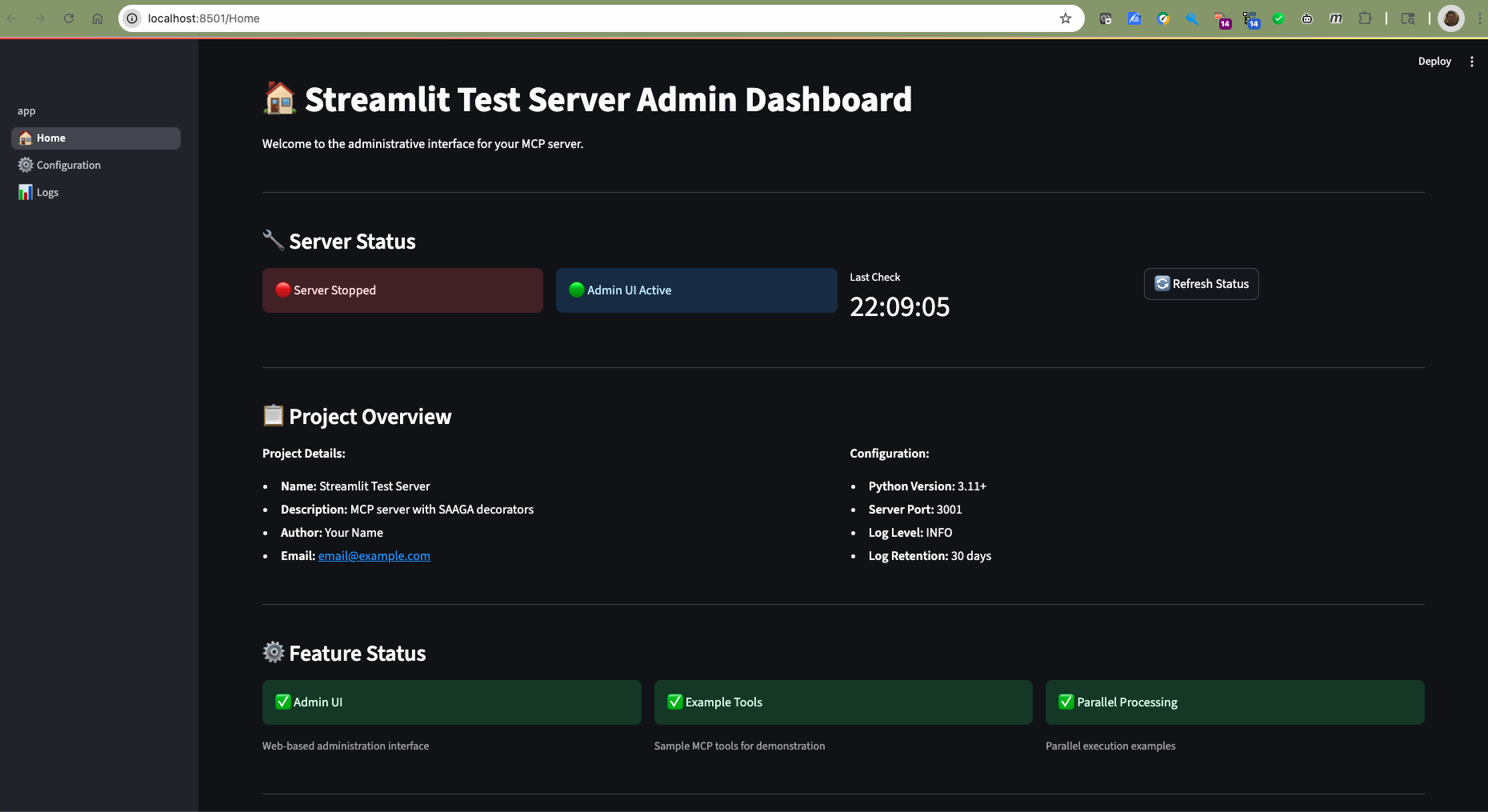
The dashboard provides:
- Real-time server status monitoring
- Project information and configuration overview
- Quick access to common actions
- System resource usage
Configuration Editor
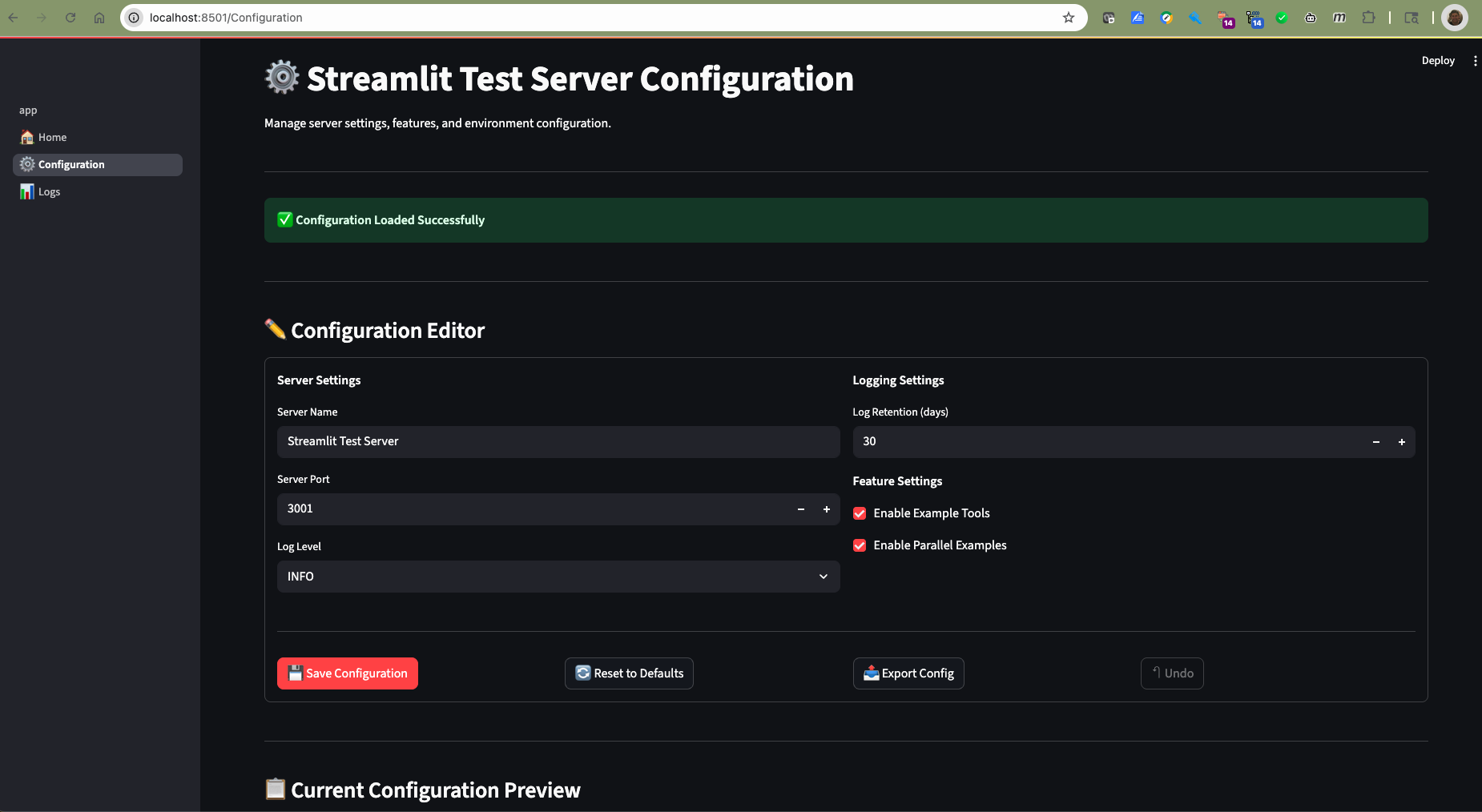
The configuration editor features:
- Live configuration editing with validation
- Diff preview showing pending changes
- Export/import functionality (JSON & YAML formats)
- Reset to defaults with confirmation dialog
- Automatic server restart notifications
Log Viewer
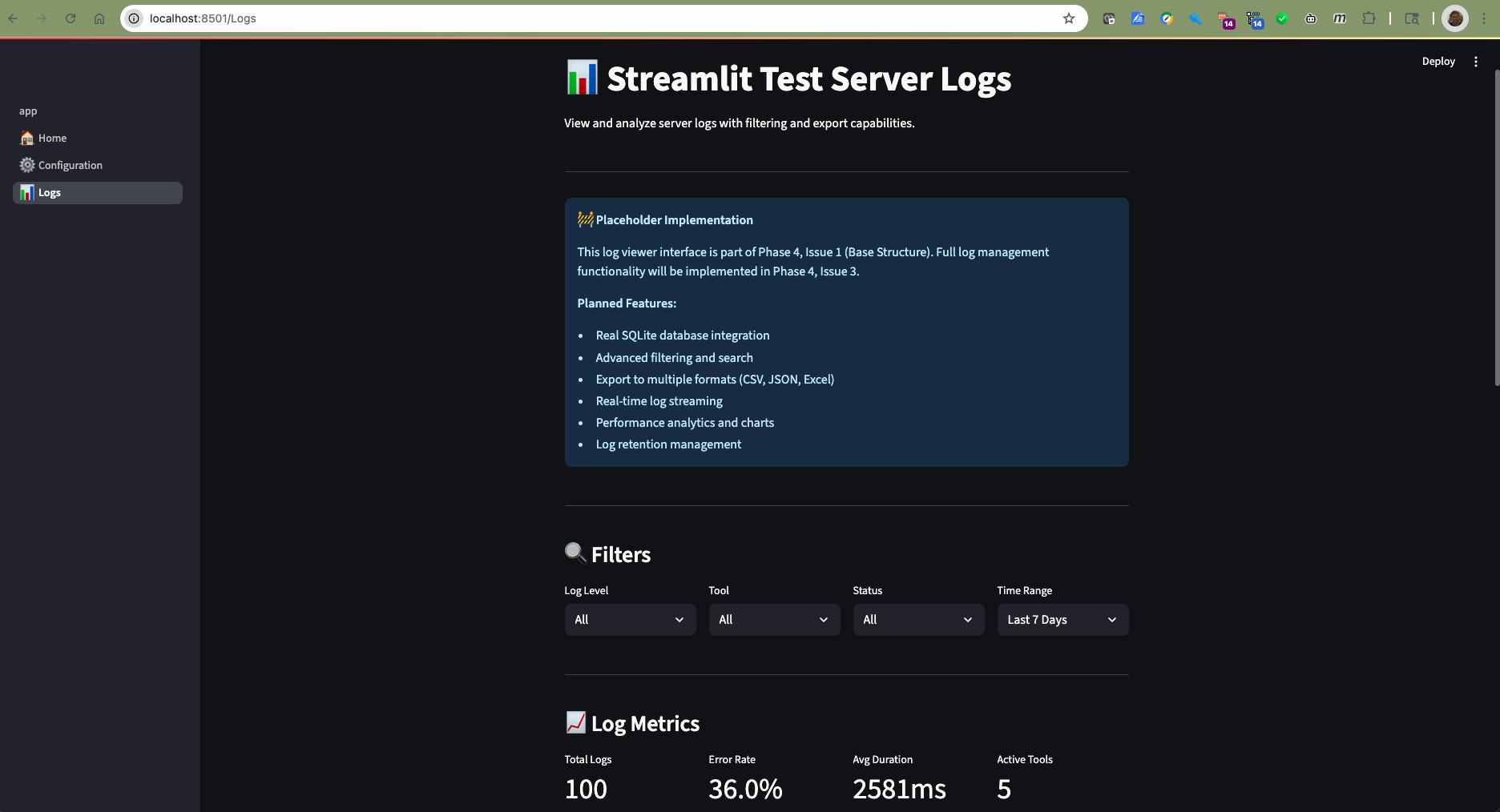
The log viewer includes:
- Date range filtering for historical analysis
- Status filtering (success/error/all)
- Tool-specific filtering
- Export capabilities for further analysis
- Real-time log updates
AI Assistant Instructions
When working with this MCP Ahrefs MCP server in an AI coding assistant (like Claude, Cursor, or GitHub Copilot):
Understanding the Server Architecture
This server uses SAAGA decorators that automatically wrap all MCP tools with:
- Exception handling: All errors are caught and returned as structured error responses
- Comprehensive logging: All tool invocations are logged with timing and parameters
- Optional parallelization: Tools marked for parallel execution run concurrently
Key Points for AI Assistants
-
Tool Registration Pattern: Tools are registered with decorators already applied. Do NOT manually wrap tools with decorators - this is handled automatically in
server/app.py. -
Parameter Types: MCP passes all parameters as strings from the client. Ensure your tools handle type conversion:
def my_tool(count: str) -> dict: # Convert string to int count_int = int(count) return {"result": count_int * 2} -
Error Handling: Tools can raise exceptions freely - the exception_handler decorator will catch them and return proper error responses.
-
Async Support: Both sync and async tools are supported. The decorators automatically detect and handle both patterns.
-
Logging: Check logs at the platform-specific data directory for debugging:
- macOS:
~/Library/Application Support/mcp_ahrefs/logs.db - Linux:
~/.local/share/mcp_ahrefs/logs.db - Windows:
%APPDATA%/mcp_ahrefs/logs.db
- macOS:
Common Tasks
Adding a new tool:
# In mcp_ahrefs/tools/my_new_tool.py
def my_new_tool(param: str) -> dict:
    """Description of what this tool does."""
    # Implementation
    return {"result": "processed"}

# In mcp_ahrefs/tools/__init__.py
from .my_new_tool import my_new_tool
example_tools.append(my_new_tool)
Testing with MCP Inspector:
# From the project root
uv run mcp dev mcp_ahrefs/server/app.py
Debugging a tool:
- Check the SQLite logs for error messages
- Run with
--log-level DEBUGfor verbose output - Test directly with MCP Inspector to see parameter handling
Important Implementation Notes
- The server uses the standard MCP SDK (
from mcp.server.fastmcp import FastMCP) - Function signatures are preserved through careful decorator implementation
- The
register_tools()function inserver/app.pyhandles all decorator application - Tools should return JSON-serializable Python objects (dict, list, str, int, etc.)
Configuration
Configuration files are stored in platform-specific locations:
- macOS:
~/Library/Application Support/mcp_ahrefs/ - Linux:
~/.local/share/mcp_ahrefs/ - Windows:
%APPDATA%/mcp_ahrefs/
Configuration Options
log_level: Logging level (INFO)log_retention_days: Days to retain logs (30)server_port: HTTP server port (3001)
Development
Project Structure
mcp_ahrefs/
├── mcp_ahrefs/
│   ├── config.py              # Platform-aware configuration
│   ├── server/
│   │   └── app.py             # FastMCP server with decorators
│   ├── tools/                 # Your MCP tools
│   ├── decorators/            # SAAGA decorators
│   └── ui/                    # Streamlit admin UI
├── tests/                     # Test suite
├── docs/                      # Documentation
└── pyproject.toml            # Project configuration
Adding New Tools
- Create a new Python file in
mcp_ahrefs/tools/ - Define your tool function
- Import and register it in
server/app.py
Example:
# mcp_ahrefs/tools/my_tool.py
def my_tool(message: str) -> str:
    """Example MCP tool."""
    return f"Processed: {message}"

# The server will automatically apply SAAGA decorators
Running Tests
pytest tests/
Code Quality
This project uses several code quality tools:
# Format code
black mcp_ahrefs/
isort mcp_ahrefs/

# Lint code
flake8 mcp_ahrefs/
mypy mcp_ahrefs/
SAAGA Decorators
This server automatically applies three key decorators to your MCP tools:
- Exception Handler: Graceful error handling with logging
- Tool Logger: Comprehensive logging to SQLite database
- Parallelize: Optional parallel processing for compute-intensive tools
Logging
Logs are stored in a SQLite database with the following schema:
timestamp: When the tool was calledtool_name: Name of the MCP toolduration_ms: Execution time in millisecondsstatus: Success/failure statusinput_args: Tool input argumentsoutput_summary: Summary of tool outputerror_message: Error details (if any)
Contributing
- Fork the repository
- Create a feature branch
- Make your changes
- Add tests for new functionality
- Run the test suite
- Submit a pull request
License
This project is licensed under the MIT License - see the LICENSE file for details.
Support
For issues and questions:
- Create an issue on GitHub
- Check the documentation in the
docs/directory - Review the test suite for usage examples
Acknowledgments
- FastMCP for the MCP framework
- SAAGA for the decorator patterns
- Cookiecutter for the templating system