
MCP Application - Context Memory Updater

This application showcases context memory using Model Context Protocol (MCP) tools in an LLM-based system. It allows different users to store, retrieve, and update their travel preferences and other general memories with intelligence assistant through a chatinterface.
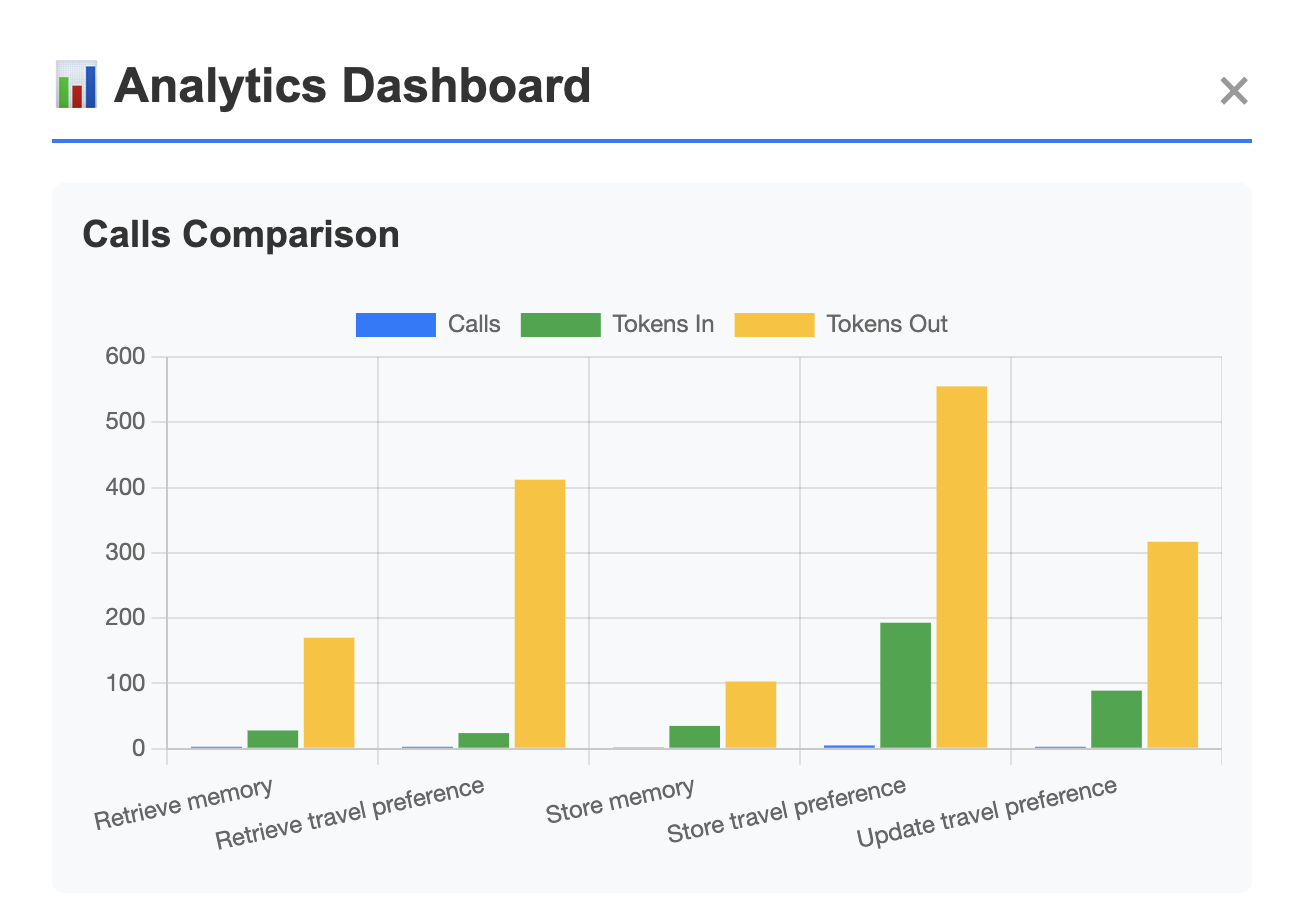
On the analytic side, the application summarizes tool usage statistics to support continuous improvement and cost control, answering questions such as which tool-call sequences happens the more frequently? or which tool incurs most tokens?
Table of Contents
- System Design
- Setup, Development, and Usage
- Tests
- Deployment
- Future Work
- Final Thoughts
- Appendices: Prompt Testing
System Design
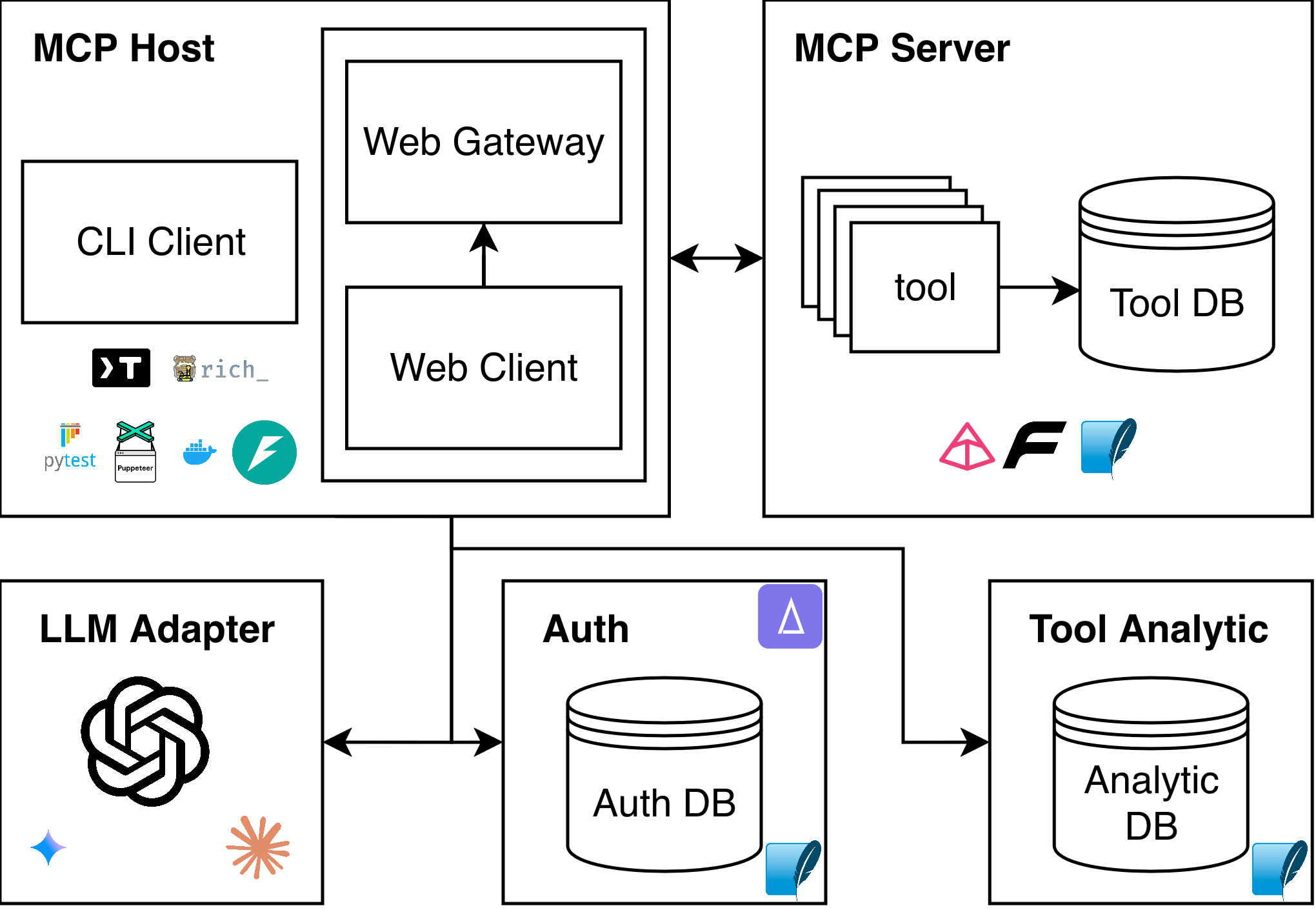
Key Design Rationale
-
Containerized MCP Server
- Chosen over serverless to maintain persistent DB connections, stable multi-turn tool state, and reproducible deployment for both MCP server and gateway.
- Provides lightweight process and network isolation, allowing the MCP server to run with minimal privileges and internal-only access.
-
Clear Server–Gateway Separation
- MCP server handles tool execution and memory logic; the Python API Gateway manages browser-safe access, authentication, and LLM request shaping.
- Prevents exposing secrets and keeps protocol logic clean.
-
Database Design
SQLitefor portability and local testing; modular data access enables drop-in replacement with PostgreSQL for production.
-
Authentication & Isolation
- Registration, token issuance, and strict per-user data isolation via
user_id; architecture leaves room for RBAC/IAM extensions.
- Registration, token issuance, and strict per-user data isolation via
-
Unified Client Architecture
- CLI and web clients share a single
client_core, ensuring consistent MCP behavior without duplicating logic. - Web client only communicates through the gateway for security and simplicity.
- Ease of Use: Both clients expose a simple chat interface, user memory retrieval, making interaction symmetric across environments.
- LLM Client Adapter: A pluggable LLM adapter abstracts API calls, allowing the system to switch between different LLM providers without modifying client logic.
- CLI and web clients share a single
-
Tooling Structure
- Memory, travel-preference, and external dummy tools model different MCP interaction patterns, CRUD state, retrieval, and simulated external actions, supporting robust LLM behavior testing.
-
Testability & Analytics
- Built-in tool-usage analytics for understanding LLM behavior and token cost.
- Multi-layer testing (unit, LLM integration, Puppeteer E2E) ensures reliability and controlled prompt evaluation.
-
Stack Choices
FastMCPfor standardized MCP protocol and tool execution, LLM interoperability via Pydantic.FastAPIfor the simple, asynchronous-friendly API gateway.Renderfor fast containerized-app hosting.Pytest+Puppeteerfor unit, integration, and end-to-end testing.
MCP Server
- Standardized, specific tools made available for LLM to utilize upon natural language query: CRUD operations for user's general memory and travel preferences
- Unified datamodel and data storage for context memory
- Containerized: more persistent, suitable for LLM integration than serverless deployment
Available Tools
The core engine that exposes standardized tools to the LLM.
- Context Tools:
store_,retrieve_,update_,delete_for both Travel Preferences and General Memory. - External Service Simulation: Dummy tools for
lookup_flights,book_hotels, etc., to test complex tool-chaining capabilities.
MCP Client
- Chat-based user interface, self-identification, individual context information
- Lightweight server analytics - how has MCP server been utilized by the client? - macro statistics of tool usage
- Two versions of client, sharing the same core functionality
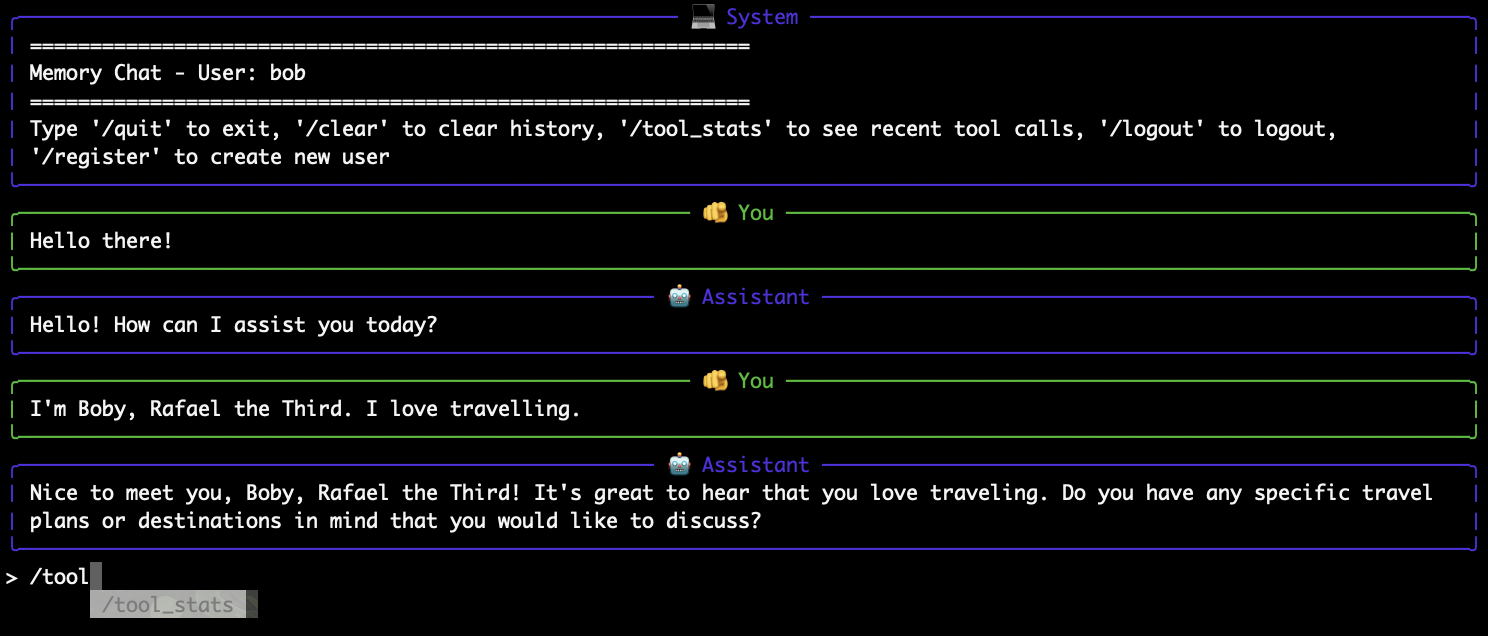
Command-Line Client
- Native Python cli application with interactive chat loop
- No deployment, only connect to local MCP server and LLM API
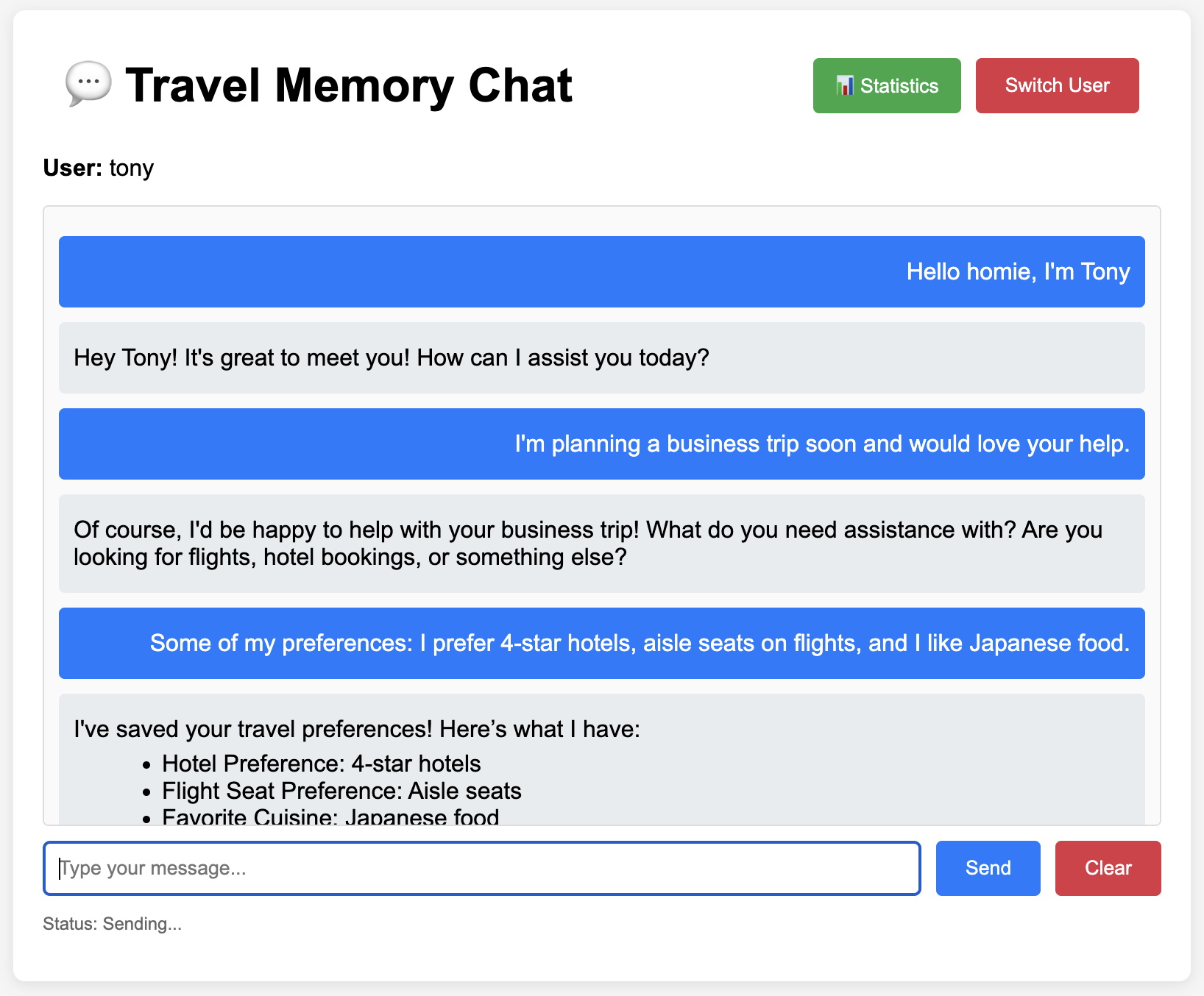
Web Client
- Lightweight frontend that interacts with the single gateway, holding no secret keys and user information
- Single page application using vanilla JS
- Python API gateway for MCP & LLM API
- Containerized and deployable
- Alternative: heavier frontend JS frameworks as a one-stop solution to connect with LLM and MCP, which also requires its own deployment process & secret management, hence falling back to simple client-gateway solution
Setup, Development, and Usage
Update local environment secret key. Never hard-code one.
cp .env.example .env
vi .env # update OPENAI_API_KEY
Local dependencies. Tested on Python 3.13. Using PyEnv to manage local Python version is recommended.
# option 1: installing in virtual environment (Pipenv--https://pipenv.pypa.io)
pipenv install
pipenv shell

# option 2: installing from frozen requirements.txt
pip install -r requirements.txt
MCP Server & Clients
MCP server and available clients can operate in multiple options.
Option 1) Starting server without container.
# start server
python src/context-updater/server.py
Option 2) Starting servers with individual containers (mcp-server & web client) & host data sync.
# build images
docker build --target mcp-server -t context-mcp-server:latest .
docker build --target web-client -t context-web-client:latest .

# start mcp-server container
docker run -d --rm -p 0.0.0.0:8000:8000 \
    -v $(pwd)/database:/app/database \
    context-mcp-server:latest

# start web-client container
docker run -d --rm -p 0.0.0.0:8001:8001 \
    --env-file .env \
    -e MCP_SERVER_URL=http://host.docker.internal:8000/mcp \
    -e PYTHONUNBUFFERED=1 \
    context-web-client:latest
Option 3) Building and starting all containers (mcp-server & web client) with docker-compose.
docker-compose build
docker-compose up -d
Non-Containerized Clients
Starting CLI client, only available for local use.
# register new user
python src/context-updater/cli_client.py --register

# login or enter chat using stored token
python src/context-updater/cli_client.py

# start web gateway & client
python src/context-updater/web-client/web_gateway.py
# web client runs on http://127.0.0.1:8001
Either option should yield following endpoint URLs:
- MCP - http://127.0.0.1:8000
- anonymous memory overview - http://127.0.0.1:8000/memory_overview
- Web-Client - http://127.0.0.1:8001
Tests
Unit testing whether MCP tools work correctly without LLM.
# Install dev dependencies
pipenv install --dev

# MCP functional test
pytest test/test_server.py test/test_auth_db.py -v -s
Integration testing whether LLM understands the data from, and can correctly interact with, MCP tools.
# make sure to start server with test flag - do not contaminate real database
IS_MCP_CONTEXT_UPDATER_TEST=true  python src/context-updater/server.py

# LLM hallunication test ~$0.20 per run - can still be flaky :/
RUN_LLM_TESTS=true pytest tests/test_llm.py -v -s

# Single test case
RUN_LLM_TESTS=true pytest test/test_llm.py::TestLLMRealHallucination::test_llm_empty_database_no_hallucination -v -s
Testing End-to-End Scenario
Run Puppeteer to test a chat scenario visually.
# check pre-dependency Node.js ≥ 18 & npm
node -v
npm -v

# install Puppeteer with its own bundled Chromium
npm install puppeteer
Start testing scenario.
# use local env to run e2e test
pipenv shell
# spin web-client & mcp-server -> run puppeteer
bash run-puppeteer.sh tony
Deployment
Deploying on Render (see actions script).
- MCP - https://context-mcp-server.onrender.com/
- anonymous memory overview - https://context-mcp-server.onrender.com/memory_overview
- Web-Client - https://context-web-client.onrender.com/
Future Work
There are several pending tasks on TODOs.
- scalable database: currently, I use SQLite to store MCP data. It's definitely not ideal. I can replace the database functions to use more robust database solution e.g., PostgreSQL or managed database services--only modify
server_database.py. - better user authorization: current simple token-based authentication may neither scale nor support role-based system. To achieve these requirements, I can implement IAM system that follows least-privilege principles, so each user or client only has access to the tools and actions they actually need.
- model performance test: I use
gpt-4o-minifor its cost effectiveness. It should be tested whether switching to more advanced models worth the costs for this type of tasks. I can create semantically difficult dataset and questions to test this out.
Final Thoughts
I chose the MCP option out of curiosity because I've recently implemented an LLM document assitant for my old blog as a toy project, which has covered most required functionalities for the RAG option, and partially for the data-driven assistant option. I felt it's a good opportunity to try building an MCP server from scratch because I've only worked with MCP tools implemented by other people. However, it was quite an open-ended requirement, leaving room for interpretation. I hope I haven't misunderstood it by far :)
The most challenging problem I encountered was the rapidly changing API specifications of all the essential libraries and tools. This makes AI coding assistant very unreliable. Documentation does not provide a good support either. Trial-and-error, with very specific questions prompts on small and concise issues, is the best workaround in this case. Holistic prompting never works.
Appendices - Prompt Testing
Prompt plays important roles in MCP application. To ensure the prompt efficiency, I ran the test on different prompt versions that focus on different aspects: minimalist, exploratory, analytical, risk-awareness, and comprehensiveness. I create mock-up conversation scenarios, collect tool usage statistics and response success, and choose the best prompt as the initial version for the application.
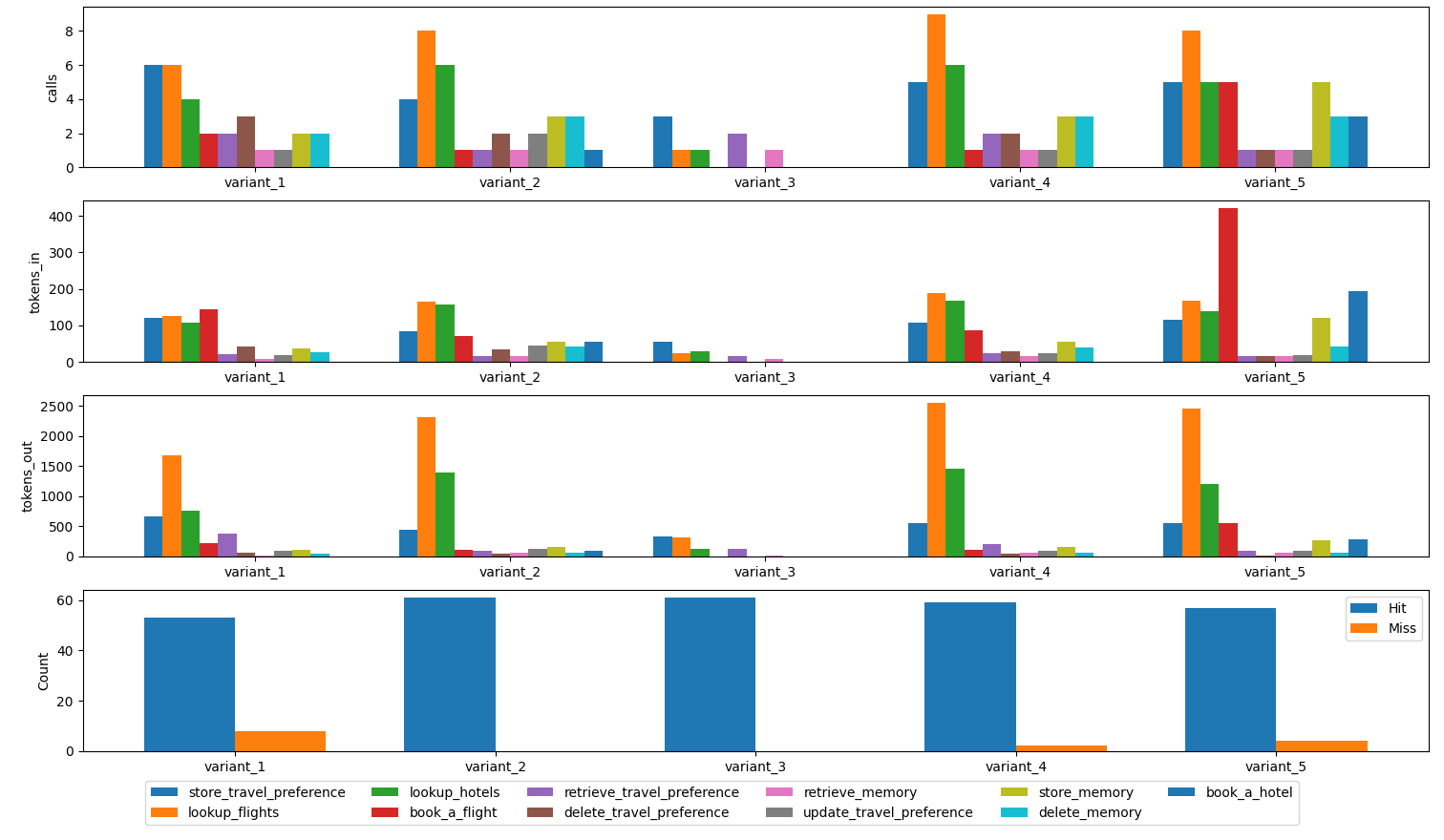
I combine variant 1 (comprehensive) and variant 2 (analytical) because a well-balanced tool call distribution, reasonable expected responses, and acceptable tokens-out which reflect the LLM cost.
pipenv install --dev
python test/prompt_test/test_prompts.py
python test/prompt_test/plot_result.py