
MCP-RLM
Recursive Language Model Agent
Infinite Context Reasoning for Large Language Models




Features • Installation • Configuration • Usage • Architecture
📋 Overview
MCP-RLM is an open-source implementation of the Recursive Language Models (RLMs) architecture introduced by researchers at MIT CSAIL (Zhang et al., 2025). It enables LLMs to process documents far beyond their context window limits through programmatic decomposition and recursive querying.
The Challenge
| Traditional LLM Approach | MCP-RLM Approach |
|---|---|
| ❌ Limited to 4K-128K token context windows | ✅ Handles 10M+ tokens seamlessly |
| ❌ Context degradation ("lost in the middle") | ✅ Maintains accuracy through chunked analysis |
| ❌ Expensive for long documents ($15/1M tokens) | ✅ Cost-effective ($3/1M tokens, 80% savings) |
| ❌ Single-pass processing bottleneck | ✅ Parallel recursive decomposition |
✨ Features
Core Capabilities
|
Technical Highlights
|
🏗 Architecture
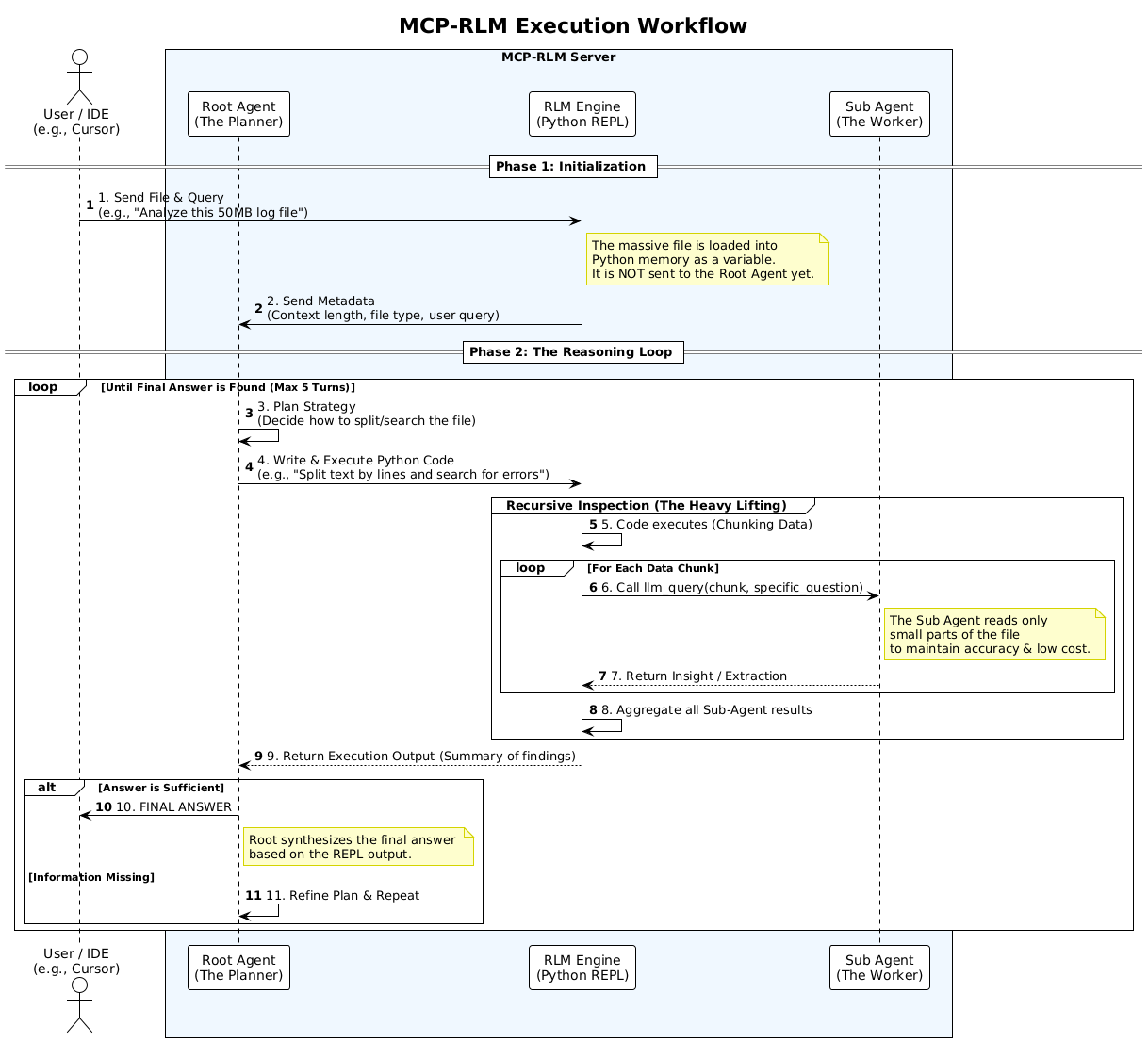
MCP-RLM employs a two-tier agent system that separates strategic planning from execution:
graph TB
    subgraph Input
        A[User Query]
        B[Large Document<br/>10M+ tokens]
    end

    subgraph "Root Agent (Planner)"
        C[Analyze Metadata]
        D[Generate Strategy]
        E[Write Python Code]
    end

    subgraph "Execution Layer"
        F[Python REPL]
        G[Chunk Manager]
    end

    subgraph "Sub Agents (Workers)"
        H1[Worker 1]
        H2[Worker 2]
        H3[Worker N]
    end

    subgraph Output
        I[Aggregated Results]
        J[Final Answer]
    end

    A --> C
    B --> C
    C --> D
    D --> E
    E --> F
    F --> G
    G --> H1
    G --> H2
    G --> H3
    H1 --> I
    H2 --> I
    H3 --> I
    I --> J

    style A fill:#e3f2fd
    style B fill:#e3f2fd
    style C fill:#fff9c4
    style D fill:#fff9c4
    style E fill:#fff9c4
    style F fill:#f3e5f5
    style G fill:#f3e5f5
    style H1 fill:#e8f5e9
    style H2 fill:#e8f5e9
    style H3 fill:#e8f5e9
    style I fill:#fce4ec
    style J fill:#fce4ec
Agent Roles
| Agent | Responsibility | Characteristics | Model Recommendations |
|---|---|---|---|
| Root Agent | Strategic planning and code generation | • Views metadata only • Generates Python strategies • Called 5-10 times per query | • Claude 3.5 Sonnet • GPT-4o • Mistral Large |
| Sub Agent | Chunk-level data extraction | • Reads small segments • Extracts specific info • Called 100-1000+ times | • GPT-4o-mini • Claude Haiku • Qwen 2.5 (free) |
🚀 Installation
Prerequisites
# Required
- Python 3.10 or higher
- pip package manager

# API Keys (choose at least one)
- OpenRouter API key (recommended for free tier)
- OpenAI API key
- Anthropic API key
- Ollama (for local deployment)
Quick Start
# Clone the repository
git clone https://github.com/MuhammadIndar/MCP-RLM.git
cd MCP-RLM

# Create virtual environment
python -m venv venv

# Activate virtual environment
# On Linux/macOS:
source venv/bin/activate
# On Windows:
venv\Scripts\activate

# Install dependencies
pip install -r requirements.txt

# Configure environment
cp .env.EXAMPLE .env
# Edit .env with your API keys

# Start the server
python server.py
Expected Output:
MCP RLM Server Started...
Listening on stdio...
⚙ Configuration
1. Environment Setup
Copy the example environment file:
cp .env.EXAMPLE .env
Edit .env with your credentials:
# OpenRouter (Recommended - includes free tier)
OPENROUTER_API_KEY=sk-or-v1-xxxxx

# OpenAI Official
OPENAI_API_KEY=sk-proj-xxxxx

# Anthropic Official
ANTHROPIC_API_KEY=sk-ant-xxxxx

# Ollama Local (optional, set to 'dummy' if not used)
OLLAMA_API_KEY=dummy
2. Provider Configuration
The config.yaml file defines available LLM providers:
providers:
  openrouter:
    type: "openai_compatible"
    base_url: "https://openrouter.ai/api/v1"
    api_key_env: "OPENROUTER_API_KEY"

  ollama_local:
    type: "openai_compatible"
    base_url: "http://localhost:11434/v1"
    api_key_env: "OLLAMA_API_KEY"

  openai_official:
    type: "openai_compatible"
    base_url: "https://api.openai.com/v1"
    api_key_env: "OPENAI_API_KEY"

  anthropic_official:
    type: "anthropic"
    api_key_env: "ANTHROPIC_API_KEY"
3. Agent Configuration
Configure which models power each agent:
agents:
  root:
    provider_ref: "openrouter"
    model: "anthropic/claude-3.5-sonnet"
    temperature: 0.0
    max_tokens: 4096

  sub:
    provider_ref: "openrouter"
    model: "qwen/qwen-2.5-vl-7b-instruct:free"
    temperature: 0.0
    max_tokens: 1000

system:
  max_loops: 5  # Maximum refinement iterations
Recommended Configurations
| Use Case | Root Agent | Sub Agent | Provider | Cost |
|---|---|---|---|---|
| Free Tier | mistral-small-3.1:free | qwen-2.5-vl-7b:free | OpenRouter | $0 |
| Best Performance | claude-3.5-sonnet | gpt-4o-mini | Mixed | $$ |
| Cost Optimized | gpt-4o | gpt-4o-mini | OpenAI | $ |
| Privacy First | claude-3.5-sonnet | llama-3.1-8b | Anthropic + Ollama | $$ |
| Fully Local | llama-3.1-70b | llama-3.1-8b | Ollama | $0 |
💻 MCP Client Integration
Supported Clients
MCP-RLM integrates with any MCP-compatible client:
| Client | Platform | Use Case |
|---|---|---|
| Claude Desktop | Desktop App | General-purpose AI assistant |
| Cursor | IDE | Code analysis and development |
| Antigravity | IDE | AI-powered development |
Configuration Instructions
Claude Desktop
1. Locate Configuration File
- macOS:
~/Library/Application Support/Claude/claude_desktop_config.json - Windows:
%APPDATA%\Claude\claude_desktop_config.json
2. Add Server Configuration
{
  "mcpServers": {
    "rlm-researcher": {
      "command": "/absolute/path/to/MCP-RLM/venv/bin/python",
      "args": ["/absolute/path/to/MCP-RLM/server.py"]
    }
  }
}
3. Restart Claude Desktop
The analyze_massive_document tool will now be available.
Example Usage:
Use the analyze_massive_document tool to read /path/to/large_log.txt
and find all ERROR entries from the last 24 hours
Cursor IDE
1. Open MCP Settings
- Navigate to Settings → Features → MCP
2. Add New Server
- Click + Add New MCP Server
- Fill in the configuration:
| Field | Value |
|---|---|
| Name | RLM-Researcher |
| Type | stdio |
| Command | /absolute/path/to/MCP-RLM/venv/bin/python |
| Args | ["/absolute/path/to/MCP-RLM/server.py"] |
3. Save and Verify
- Green indicator = Connected ✅
- Red indicator = Configuration error ❌
Antigravity IDE
Option A: Via UI
- Click the
...menu in the agent panel - Select Manage MCP Servers
- Add server using the same configuration as Cursor
Option B: Manual Configuration
Edit ~/.gemini/antigravity/mcp_config.json:
{
  "mcpServers": {
    "rlm-researcher": {
      "command": "/absolute/path/to/MCP-RLM/venv/bin/python",
      "args": ["/absolute/path/to/MCP-RLM/server.py"],
      "enabled": true
    }
  }
}
📖 Usage
Available Tool
analyze_massive_document(file_path: str, query: str)
Analyzes large documents using recursive decomposition.
Parameters:
file_path(string): Absolute path to the documentquery(string): Natural language query about the document
Returns: Analysis results as text
Example Queries
# Log Analysis
"Analyze /var/log/nginx/access.log and identify the top 10 IP addresses
 making requests, along with their request patterns"

# Codebase Security Audit
"Scan the entire /src directory and find all instances where user input
 is directly used in SQL queries without sanitization"

# Research Paper Synthesis
"Read all PDF files in /papers/machine-learning/ and summarize
 the common evaluation metrics used across studies"

# Configuration Validation
"Parse /etc/config/*.yaml files and verify that all required
 security parameters are present and properly configured"
Performance Metrics
Based on testing with OpenRouter free tier models:
| Document Size | Sub-Agent Calls | Processing Time | Cost (Free Tier) |
|---|---|---|---|
| 10K tokens | ~10 | 10 seconds | $0.00 |
| 100K tokens | ~100 | 1 minute | $0.00 |
| 1M tokens | ~500 | 5 minutes | $0.00 |
| 10M tokens | ~2000 | 20 minutes | $0.00 |
Note: Times vary based on model speed and network latency
📁 Project Structure
MCP-RLM/
├── assets/
│   └── RLM.png              # Architecture diagram
│
├── .env.EXAMPLE             # Environment variables template
├── .gitignore               # Git ignore patterns
├── LICENSE                  # MIT License
├── README.md                # This documentation
├── config.yaml              # Provider & agent configuration
├── requirements.txt         # Python dependencies
│
├── server.py                # MCP server entry point
├── rlm_engine.py            # Core RLM recursive logic
├── llm_factory.py           # Multi-provider LLM abstraction
└── prompts.py               # System prompts for agents
Core Components
| File | Purpose |
|---|---|
server.py | MCP server implementation with FastMCP |
rlm_engine.py | Recursive execution engine with Python REPL |
llm_factory.py | Unified interface for OpenAI/Anthropic/Ollama |
prompts.py | System prompt for Root Agent strategy |
config.yaml | Provider and agent configuration |
🔬 Research Foundation
This implementation is based on cutting-edge research from MIT CSAIL:
Recursive Language Models
Alex L. Zhang, Tim Kraska, Omar Khattab
MIT Computer Science & Artificial Intelligence Laboratory, 2025
📄 arXiv:2512.24601
Key Contributions
| Concept | Description |
|---|---|
| Programmatic Decomposition | Treat long prompts as external databases accessible via code |
| Recursive Self-Querying | Break complex queries into manageable sub-problems |
| Two-Tier Architecture | Separate strategic planning from execution for cost efficiency |
| Infinite Scaling | Process documents orders of magnitude larger than context windows |
Performance Gains
According to the paper, RLM achieves:
- 94% accuracy on needle-in-haystack tasks (vs 23% for standard LLMs)
- 79% cost reduction compared to loading full context
- Linear scaling with document size instead of quadratic
🤝 Contributing
Contributions are welcome! Here's how you can help:
- Fork the repository
- Create a feature branch (
git checkout -b feature/amazing-feature) - Commit your changes (
git commit -m 'Add amazing feature') - Push to the branch (
git push origin feature/amazing-feature) - Open a Pull Request
Development Setup
# Install development dependencies
pip install -r requirements.txt

# Run linting
flake8 *.py

# Run type checking
mypy *.py
📄 License
This project is licensed under the MIT License - see the LICENSE file for details.
MIT License - Copyright (c) 2025 MCP-RLM Contributors
Acknowledgments
- MIT CSAIL - Original RLM research and theoretical foundation
- Anthropic - Model Context Protocol specification and Claude models
- OpenRouter - Free tier access to multiple LLM providers
- Ollama - Local LLM deployment infrastructure
📞 Support
- Issues: GitHub Issues
- Discussions: GitHub Discussions
If you find this project useful, please consider giving it a ⭐

