
MCP-Ables
Turn any shell command into MCP Server
Why bother coding long MCP servers for every need, when you can just use MCP-Ables?
What is MCP-Ables?
MCP-Ables bridges the gap between command-line tools and AI agents like Claude Code. Write a tiny YAML file describing your shell command, and MCP-Ables automatically generates an MCP (Model Context Protocol) server that AI agents can call.
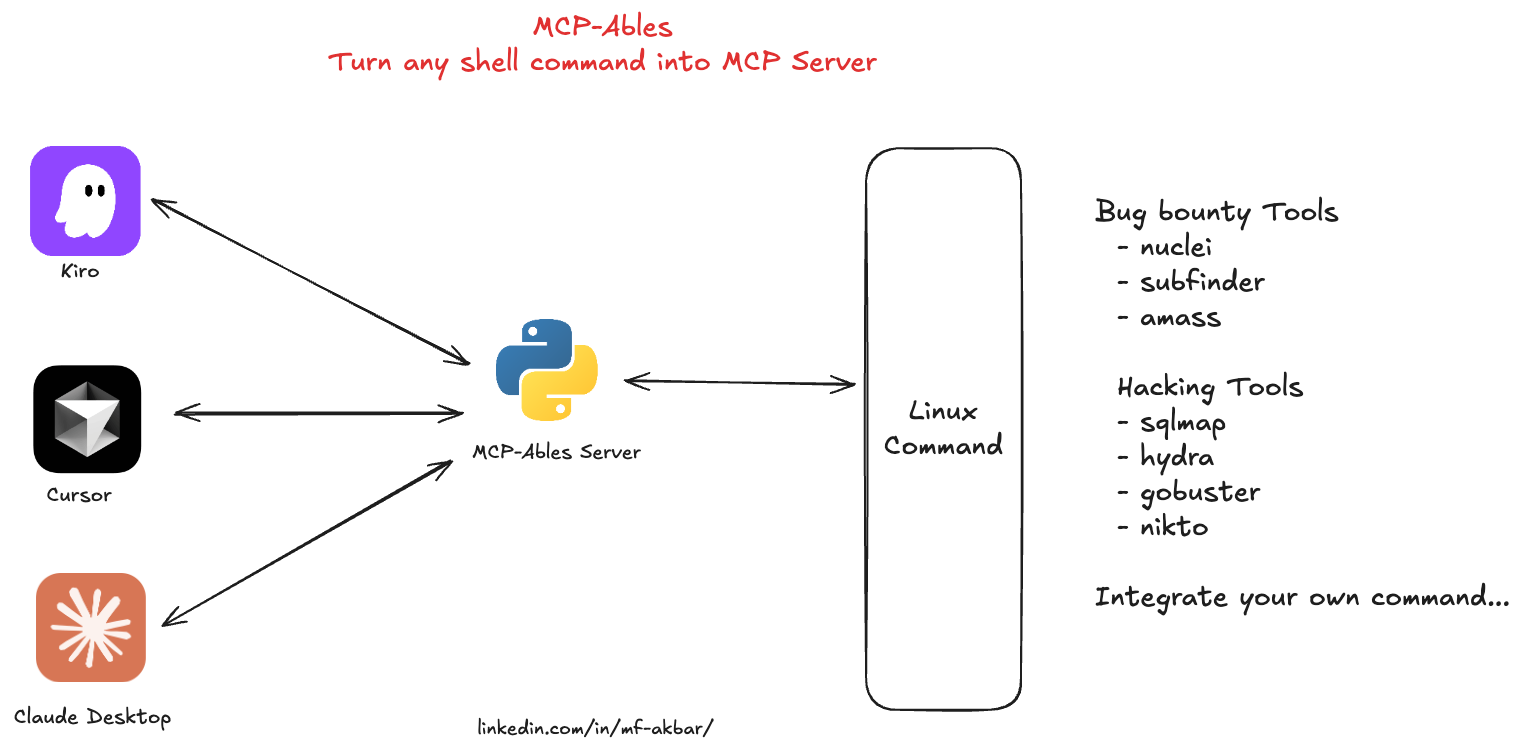
No Python coding. No complex setup. Just YAML → MCP → AI-callable tools.
Quick Start
Prerequisites
- Python 3.11+
- The command-line tool you want to expose (e.g.,
nuclei,nmap,kubectl, etc.)
Installation
git clone https://github.com/mfakbar127/MCP-Ables.git
cd MCP-Ables
pip install -r requirements.txt
Usage
-
Create a YAML file describing your tool(s) (see examples below)
-
Run MCP-Ables with a file or directory:
# Single file python mcpables-main.py examples/nuclei.yaml # Directory (scans recursively for .yaml/.yml files) python mcpables-main.py examples/ -
The MCP server 'mcpables' is now running with all your tools!
Yaml Exampl - Simple Echo
examples/tools/echo.yaml:
name: echo_message
description: Echo a message to stdout (simple test tool)

run:
  kind: shell
  cmd: "echo {{message}}"

args:
  message:
    type: string
    description: "Message to echo"
    required: true
Run it:
python mcpables-main.py examples/tools/echo.yaml
Available MCP Tools
| Tool Name | Description | Category | Location |
|---|---|---|---|
| cloudlist | Enumerate assets across cloud providers (ProjectDiscovery) | security | tools/security/pd/cloudlist.yaml |
| subfinder | Passive subdomain enumeration (ProjectDiscovery) | security | tools/security/pd/subfinder.yaml |
| naabu | Fast port scanning of hosts (ProjectDiscovery) | security | tools/security/pd/naabu.yaml |
| asnmap | ASN, domain, IP, and org network range lookups (ProjectDiscovery) | security | tools/security/pd/asnmap.yaml |
| mapcidr | CIDR/IP processing and slicing for mass scanning (ProjectDiscovery) | security | tools/security/pd/mapcidr.yaml |
| hacking-tools | Bundle of offensive tools (sqlmap, hydra, gobuster, nikto) | security | tools/security/hacking-tools.yaml |
Use Cases
🔐 SecOps Vibes
Run security scanners from chat to enumerate assets, discover vulnerabilities, and map attack surfaces; you can run commands such as nmap, nuclei, and subfinder.
🎯 Hacking Vibes
Trigger offensive workflows like SQLi testing, brute‑forcing, content discovery, and web scanning from chat; you can run commands such as sqlmap, hydra, gobuster, and nikto.
🚀 DevOps Vibes
Control infrastructure from chat for deployments, cluster operations, configuration management, and packaging; you can run commands such as kubectl, terraform, ansible, and helm.
🖥️ SysAdmin Vibes
Administer servers from chat, including services, containers, logs, and firewall rules; you can run commands such as systemctl, docker, journalctl, and iptables.
🌐 NetOps Vibes
Run network diagnostics like connectivity tests, path tracing, DNS queries, and domain lookups; you can run commands such as ping, traceroute, dig, and whois.
📊 Data Vibes
Process data from the CLI, including JSON parsing, HTTP requests, text filtering, and media conversion; you can run commands such as jq, curl, grep/awk, and ffmpeg.
YAML Schema
See examples/
Single-Tool Format
name: <tool_name>
description: <brief description for AI agents>

run:
  kind: shell
  cmd: "command {{arg1}} {{arg2}}"

args:
  arg1:
    type: string|int|float|bool
    description: "What this argument does"
    required: true|false
    default: <optional default value>
Multi-Tool Format
Define multiple tools in one YAML file:
tools:
  - name: tool1
    description: First tool description
    run:
      kind: shell
      cmd: "command1 {{arg1}}"
    args:
      arg1:
        type: string
        description: "Argument description"
        required: true

  - name: tool2
    description: Second tool description
    run:
      kind: shell
      cmd: "command2 {{arg2}}"
    args:
      arg2:
        type: int
        description: "Argument description"
        required: false
        default: 10
Argument Fields
- type: Data type (
string,int,float,bool) - description: Human-readable explanation for AI agents to understand usage
- required: Whether the argument must be provided (
trueorfalse) - default: Default value if not provided (only for optional arguments)
Examples
Nuclei Scanner
examples/tools/nuclei.yaml:
name: nuclei_scan
description: Run Nuclei vulnerability scanner against a target URL or IP address

run:
  kind: shell
  cmd: "nuclei -c {{concurrency}} -t {{target}} -t {{template_path}}"

args:
  target:
    type: string
    description: "Target URL or IP address to scan (e.g., https://example.com)"
    required: true

  template_path:
    type: string
    description: "Path to Nuclei templates directory (e.g., ~/nuclei-templates/)"
    required: true

  concurrency:
    type: int
    description: "Number of concurrent requests (1-100)"
    required: false
    default: 10
Multi-Tool Example
examples/security-tools.yaml:
tools:
  - name: nmap_scan
    description: Run Nmap network scanner against a target
    run:
      kind: shell
      cmd: "nmap {{scan_type}} {{target}}"
    args:
      target:
        type: string
        description: "Target IP or hostname"
        required: true
      scan_type:
        type: string
        description: "Scan type flag (e.g., -sV)"
        required: false
        default: "-sV"

  - name: whois_lookup
    description: Perform WHOIS lookup for a domain
    run:
      kind: shell
      cmd: "whois {{domain}}"
    args:
      domain:
        type: string
        description: "Domain name to lookup"
        required: true

  - name: dig_dns
    description: DNS lookup using dig command
    run:
      kind: shell
      cmd: "dig {{record_type}} {{domain}}"
    args:
      domain:
        type: string
        description: "Domain name to query"
        required: true
      record_type:
        type: string
        description: "DNS record type (A, MX, TXT, etc.)"
        required: false
        default: "A"
Run it:
python mcpables-main.py examples/security-tools.yaml
# Loads 3 tools: nmap_scan, whois_lookup, dig_dns
Directory Example
Organize tools in separate files:
examples/tools/
├── ping.yaml     (ping_host tool)
├── curl.yaml     (http_request tool)
└── ...
Run all tools from directory:
python mcpables-main.py examples/tools/
# Recursively loads all .yaml/.yml files
Claude Desktop Integration
Connect MCP-Ables to Claude Desktop so AI can use your tools directly from chat.
Configuration
-
Locate Claude Desktop config file:
- macOS:
~/Library/Application Support/Claude/claude_desktop_config.json - Linux:
~/.config/Claude/claude_desktop_config.json - Windows:
%APPDATA%\Claude\claude_desktop_config.json
- macOS:
-
Add MCP-Ables server:
{
  "mcpServers": {
    "mcpables": {
      "command": "python",
      "args": [
        "/absolute/path/to/mcpables-main.py",
        "/absolute/path/to/examples/"
      ]
    }
  }
}
- Restart Claude Desktop - Tools will automatically appear
Configuration Examples
Single file (specific vibe):
{
  "mcpServers": {
    "secops": {
      "command": "python",
      "args": ["/path/to/mcpables-main.py", "/path/to/examples/secops-tools.yaml"]
    }
  }
}
Directory (all tools):
{
  "mcpServers": {
    "mcpables-all": {
      "command": "python",
      "args": ["/path/to/mcpables-main.py", "/path/to/examples/"]
    }
  }
}
Multiple configurations (different vibes):
{
  "mcpServers": {
    "secops": {
      "command": "python",
      "args": ["/path/to/mcpables-main.py", "/path/to/examples/secops-tools.yaml"]
    },
    "devops": {
      "command": "python",
      "args": ["/path/to/mcpables-main.py", "/path/to/examples/devops-tools.yaml"]
    },
    "netops": {
      "command": "python",
      "args": ["/path/to/mcpables-main.py", "/path/to/examples/netops-tools.yaml"]
    }
  }
}
Verify Connection
After restarting Claude Desktop, you can verify the tools are available:
- Type a message asking Claude about available tools
- Tools will appear with names like
nuclei_scan,nmap_scan, etc. - Claude can now execute commands directly!
Author
Created by Muh. Fani "Rama" Akbar linkedin.com/in/mf-akbar/