
📚 Academic MCP
🔬 academic-mcp is a Python-based MCP server that enables users to search, download, and read academic papers from various platforms. It provides three main tools:
- 🔎
paper_search: Search papers across multiple academic databases - 📥
paper_download: Download paper PDFs, return paths of downloaded files - 📖
paper_read: Extract and read text content from papers


📑 Table of Contents
✨ Features
- 🌐 Multi-Source Support: Search and download papers from 19+ academic databases including arXiv, PubMed, PubMed Central, bioRxiv, medRxiv, Google Scholar, IACR ePrint Archive, Semantic Scholar, CrossRef, Science Direct, Springer, IEEE Xplore, Scopus, CORE, and more.
- 🎯 Unified Interface: All platforms accessible through consistent
paper_search,paper_download, andpaper_readtools. - 📊 Standardized Output: Papers are returned in a consistent dictionary format via the
Paperclass. - ⚡ Asynchronous Operations: Efficiently handles concurrent searches and downloads using
httpxand async/await. - 🔌 MCP Integration: Compatible with MCP clients for LLM context enhancement.
- 🧩 Extensible Design: Easily add new academic platforms by extending the
sourcesmodule.
🎬 Screenshot
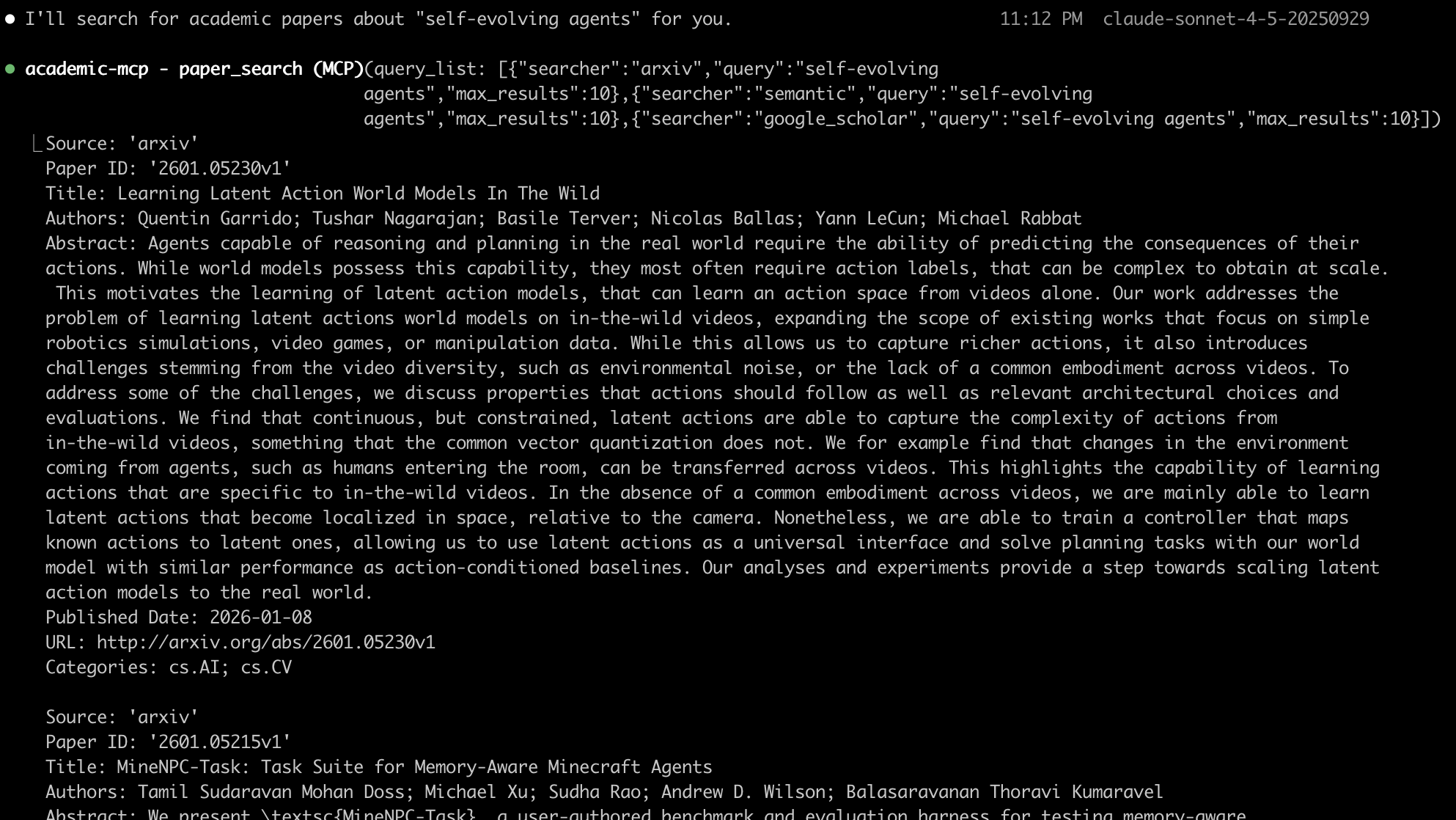
📝 Supported Academic Platforms
✅ Fully Implemented (19 sources)
Free & Open Access:
- arXiv - Pre-print repository for physics, mathematics, CS, and more
- PubMed - Biomedical literature database
- PubMed Central (PMC) - Free full-text biomedical and life sciences articles
- bioRxiv - Pre-print server for biology
- medRxiv - Pre-print server for health sciences
- Semantic Scholar - AI-powered research tool
- CrossRef - DOI registration agency and metadata provider
- Google Scholar - Academic search engine
- IACR ePrint Archive - Cryptology pre-prints
- CORE - Open access research papers aggregator
API Key Required:
- Science Direct - Elsevier's full-text scientific database (requires Elsevier API key)
- Springer Link - Springer's scientific publications (requires Springer API key)
- IEEE Xplore - IEEE's digital library (requires IEEE API key)
- Scopus - Elsevier's abstract and citation database (requires Scopus API key)
Institutional Access Required:
- ACM Digital Library - ACM's computing literature (no public API)
- Web of Science - Clarivate's citation database (requires subscription)
- JSTOR - Digital library of academic journals (no public API)
- ResearchGate - Academic social network (no official API)
Retired Services:
- Microsoft Academic - Service retired December 31, 2021 (placeholder implementation)
📦 Installation
academic-mcp can be installed using uv or pip. Below are detailed installation guides for different scenarios.
⚡ Quick Install
Install the package:
pip install academic-mcp
Or using uv (recommended for faster installation):
uv pip install academic-mcp
🔧 MCP Client Configuration
Choose your MCP client and follow the configuration steps:
1️⃣ Claude Desktop
Location:
- macOS:
~/Library/Application Support/Claude/claude_desktop_config.json - Windows:
%APPDATA%\Claude\claude_desktop_config.json
Configuration:
{
  "mcpServers": {
    "academic-mcp": {
      "command": "python",
      "args": ["-m", "academic_mcp"],
      "env": {
        "SEMANTIC_SCHOLAR_API_KEY": "",
        "SCIENCEDIRECT_API_KEY": "",
        "SPRINGER_API_KEY": "",
        "IEEE_API_KEY": "",
        "SCOPUS_API_KEY": "",
        "CORE_API_KEY": "",
        "ACADEMIC_MCP_DOWNLOAD_PATH": "./downloads"
      }
    }
  }
}
Using with uvx (alternative):
{
  "mcpServers": {
    "academic-mcp": {
      "command": "uvx",
      "args": ["academic-mcp"],
      "env": {
        "SEMANTIC_SCHOLAR_API_KEY": "",
        "SCIENCEDIRECT_API_KEY": "",
        "SPRINGER_API_KEY": "",
        "IEEE_API_KEY": "",
        "SCOPUS_API_KEY": "",
        "CORE_API_KEY": "",
        "ACADEMIC_MCP_DOWNLOAD_PATH": "./downloads"
      }
    }
  }
}
2️⃣ Claude Code (CLI)
Location: ~/.config/claude/config.json
Configuration:
{
  "mcpServers": {
    "academic-mcp": {
      "command": "python",
      "args": ["-m", "academic_mcp"],
      "env": {
        "SEMANTIC_SCHOLAR_API_KEY": "",
        "SCIENCEDIRECT_API_KEY": "",
        "SPRINGER_API_KEY": "",
        "IEEE_API_KEY": "",
        "SCOPUS_API_KEY": "",
        "CORE_API_KEY": "",
        "ACADEMIC_MCP_DOWNLOAD_PATH": "./downloads"
      }
    }
  }
}
Verify Installation:
# Check if academic-mcp is loaded
claude mcp list

# Test the server
claude mcp test academic-mcp
3️⃣ Cline (VS Code Extension)
Location: VS Code Settings → Extensions → Cline → MCP Settings
Method 1: Through VS Code Settings UI
- Open VS Code Settings (Cmd/Ctrl + ,)
- Search for "Cline MCP"
- Click "Edit in settings.json"
- Add the configuration:
{
  "cline.mcpServers": {
    "academic-mcp": {
      "command": "python",
      "args": ["-m", "academic_mcp"],
      "env": {
        "SEMANTIC_SCHOLAR_API_KEY": "",
        "SCIENCEDIRECT_API_KEY": "",
        "SPRINGER_API_KEY": "",
        "IEEE_API_KEY": "",
        "SCOPUS_API_KEY": "",
        "CORE_API_KEY": "",
        "ACADEMIC_MCP_DOWNLOAD_PATH": "./downloads"
      }
    }
  }
}
Method 2: Direct settings.json Edit
Edit ~/.config/Code/User/settings.json (Linux/macOS) or %APPDATA%\Code\User\settings.json (Windows):
{
  "cline.mcpServers": {
    "academic-mcp": {
      "command": "python",
      "args": ["-m", "academic_mcp"],
      "env": {
        "SEMANTIC_SCHOLAR_API_KEY": "",
        "SCIENCEDIRECT_API_KEY": "",
        "SPRINGER_API_KEY": "",
        "IEEE_API_KEY": "",
        "SCOPUS_API_KEY": "",
        "CORE_API_KEY": "",
        "ACADEMIC_MCP_DOWNLOAD_PATH": "./downloads"
      }
    }
  }
}
4️⃣ Zed Editor
Location: ~/.config/zed/settings.json
Configuration:
{
  "context_servers": {
    "academic-mcp": {
      "command": {
        "path": "python",
        "args": ["-m", "academic_mcp"]
      },
      "settings": {
        "env": {
          "SEMANTIC_SCHOLAR_API_KEY": "",
          "SCIENCEDIRECT_API_KEY": "",
          "SPRINGER_API_KEY": "",
          "IEEE_API_KEY": "",
          "SCOPUS_API_KEY": "",
          "CORE_API_KEY": "",
          "ACADEMIC_MCP_DOWNLOAD_PATH": "./downloads"
        }
      }
    }
  }
}
5️⃣ Custom MCP Client
For other MCP clients, use the standard MCP server configuration:
Server Command:
python -m academic_mcp
Environment Variables:
SEMANTIC_SCHOLAR_API_KEY: Optional API key for Semantic ScholarSCIENCEDIRECT_API_KEY: Optional API key for Science DirectSPRINGER_API_KEY: Optional API key for Springer LinkIEEE_API_KEY: Optional API key for IEEE XploreSCOPUS_API_KEY: Optional API key for ScopusCORE_API_KEY: Optional API key for COREACADEMIC_MCP_DOWNLOAD_PATH: Download directory (default:./downloads)
Server Capabilities:
- Tools:
paper_search,paper_download,paper_read - Transport: stdio
- Protocol: MCP 1.0
📝 Configuration Notes
API Keys:
- All API keys are optional - most sources work without them
- API keys only needed for premium services (Science Direct, Springer, IEEE, Scopus, Web of Science)
- Free services (arXiv, PubMed, PMC, bioRxiv, etc.) work immediately without any API keys
- Get API keys from respective provider websites:
- Semantic Scholar: https://www.semanticscholar.org/product/api
- Elsevier (Science Direct/Scopus): https://dev.elsevier.com/
- Springer Nature: https://dev.springernature.com/
- IEEE: https://developer.ieee.org/
- CORE: https://core.ac.uk/services/api
Download Path:
- Use absolute paths for
ACADEMIC_MCP_DOWNLOAD_PATHto avoid confusion- Ensure the directory exists or the server will create it
- Example:
/Users/yourusername/Documents/papersorC:\Users\yourusername\papersPython Environment:
- Ensure
pythoncommand points to Python 3.10+- For virtual environments, use the full path:
/path/to/venv/bin/python- For conda:
/path/to/conda/envs/yourenv/bin/python
🎛️ Source Control Examples
You can control which academic sources are enabled at startup using environment variables:
Example 1: Enable Only Free Sources
{
  "mcpServers": {
    "academic-mcp": {
      "command": "python",
      "args": ["-m", "academic_mcp"],
      "env": {
        "ACADEMIC_MCP_ENABLED_SOURCES": "arxiv,pubmed,pmc,biorxiv,medrxiv,semantic,core,crossref",
        "ACADEMIC_MCP_DOWNLOAD_PATH": "./downloads"
      }
    }
  }
}
Example 2: Disable Premium/Subscription Services
{
  "mcpServers": {
    "academic-mcp": {
      "command": "python",
      "args": ["-m", "academic_mcp"],
      "env": {
        "ACADEMIC_MCP_DISABLED_SOURCES": "ieee,scopus,springer,sciencedirect,wos,acm,jstor,researchgate",
        "ACADEMIC_MCP_DOWNLOAD_PATH": "./downloads"
      }
    }
  }
}
Example 3: Enable Only Biology/Medicine Sources
{
  "mcpServers": {
    "academic-mcp": {
      "command": "python",
      "args": ["-m", "academic_mcp"],
      "env": {
        "ACADEMIC_MCP_ENABLED_SOURCES": "pubmed,pmc,biorxiv,medrxiv",
        "ACADEMIC_MCP_DOWNLOAD_PATH": "./downloads"
      }
    }
  }
}
Example 4: Enable Only Computer Science Sources
{
  "mcpServers": {
    "academic-mcp": {
      "command": "python",
      "args": ["-m", "academic_mcp"],
      "env": {
        "ACADEMIC_MCP_ENABLED_SOURCES": "arxiv,semantic,ieee,acm",
        "IEEE_API_KEY": "your-ieee-key-here",
        "ACADEMIC_MCP_DOWNLOAD_PATH": "./downloads"
      }
    }
  }
}
🛠️ For Development
For developers who want to modify the code or contribute:
-
Setup Environment:
# Install uv if not installed curl -LsSf https://astral.sh/uv/install.sh | sh # Clone repository git clone https://github.com/LinXueyuanStdio/academic-mcp.git cd academic-mcp # Create and activate virtual environment uv venv source .venv/bin/activate # On Windows: .venv\Scripts\activate -
Install Dependencies:
# Install dependencies (recommended)
uv pip install -e .

# Add development dependencies (optional)
uv pip install pytest flake8
🚀 Usage
Once configured, academic-mcp provides three main tools accessible through Claude Desktop or any MCP-compatible client:
1. Search Papers (paper_search)
Search for academic papers across multiple sources:
Basic Search Examples:
# Search arXiv for machine learning papers
paper_search([
    {"searcher": "arxiv", "query": "machine learning", "max_results": 5}
])

# Search PubMed Central for biomedical papers
paper_search([
    {"searcher": "pmc", "query": "cancer treatment", "max_results": 5}
])

# Search CORE for open access papers
paper_search([
    {"searcher": "core", "query": "climate change", "max_results": 5}
])
Multi-Platform Search:
# Search multiple platforms simultaneously
paper_search([
    {"searcher": "arxiv", "query": "deep learning", "max_results": 5},
    {"searcher": "pubmed", "query": "cancer immunotherapy", "max_results": 3},
    {"searcher": "pmc", "query": "diabetes treatment", "max_results": 3},
    {"searcher": "semantic", "query": "climate change", "max_results": 4, "year": "2020-2023"}
])
Premium Sources (require API keys):
# Search IEEE Xplore (requires IEEE_API_KEY)
paper_search([
    {"searcher": "ieee", "query": "neural networks", "max_results": 5}
])

# Search Springer Link (requires SPRINGER_API_KEY)
paper_search([
    {"searcher": "springer", "query": "quantum computing", "max_results": 5}
])

# Search Scopus (requires SCOPUS_API_KEY)
paper_search([
    {"searcher": "scopus", "query": "artificial intelligence", "max_results": 5}
])
Search All Platforms:
# Search all platforms (omit "searcher" parameter)
paper_search([
    {"query": "quantum computing", "max_results": 10}
])
2. Download Papers (paper_download)
Download paper PDFs using their identifiers:
# Download from free sources
paper_download([
    {"searcher": "arxiv", "paper_id": "2106.12345"},
    {"searcher": "pubmed", "paper_id": "32790614"},
    {"searcher": "pmc", "paper_id": "PMC7419405"},
    {"searcher": "biorxiv", "paper_id": "10.1101/2020.01.01.123456"},
    {"searcher": "semantic", "paper_id": "DOI:10.18653/v1/N18-3011"}
])

# Download from CORE (open access)
paper_download([
    {"searcher": "core", "paper_id": "123456789"}
])
Note: Premium sources (IEEE, Springer, Science Direct, Scopus) require institutional access or subscriptions for PDF downloads.
3. Read Papers (paper_read)
Extract and read text content from papers:
# Read papers from free sources
paper_read(searcher="arxiv", paper_id="2106.12345")
paper_read(searcher="pubmed", paper_id="32790614")
paper_read(searcher="pmc", paper_id="PMC7419405")
paper_read(searcher="biorxiv", paper_id="10.1101/2020.01.01.123456")
paper_read(searcher="semantic", paper_id="DOI:10.18653/v1/N18-3011")
paper_read(searcher="core", paper_id="123456789")
⚙️ Environment Variables
Optional API Keys (for enhanced features):
SEMANTIC_SCHOLAR_API_KEY: Semantic Scholar API key for higher rate limitsSCIENCEDIRECT_API_KEY: Elsevier API key for Science Direct accessSPRINGER_API_KEY: Springer Nature API key for Springer Link accessIEEE_API_KEY: IEEE API key for IEEE Xplore accessSCOPUS_API_KEY: Elsevier API key for Scopus accessCORE_API_KEY: CORE API key for open access papersWOS_API_KEY: Web of Science API key (requires institutional subscription)
General Settings:
ACADEMIC_MCP_DOWNLOAD_PATH: Directory for downloaded PDFs (default:./downloads)
Source Control (Enable/Disable Sources):
Control which academic sources are available for searching and downloading:
-
ACADEMIC_MCP_ENABLED_SOURCES: Comma-separated list of sources to enable- Behavior: If set, ONLY the specified sources will be enabled (whitelist mode)
- Example:
"arxiv,pubmed,pmc,semantic,core"enables only free sources - Use case: Restrict to specific platforms you need or have access to
-
ACADEMIC_MCP_DISABLED_SOURCES: Comma-separated list of sources to disable- Behavior: If set, all sources EXCEPT the specified ones will be enabled (blacklist mode)
- Example:
"ieee,scopus,springer,sciencedirect,wos,acm,jstor,researchgate"disables premium sources - Use case: Exclude platforms that require subscriptions or have rate limits
Priority Rules:
- If both variables are set,
ACADEMIC_MCP_ENABLED_SOURCEStakes precedence - If neither is set, all 18 sources are enabled by default
Available Source Names (18 total):
| Source Name | Type | API Key Required | Description |
|---|---|---|---|
arxiv | Free | - | Preprint repository for physics, mathematics, computer science |
pubmed | Free | - | Biomedical literature from MEDLINE |
pmc | Free | - | PubMed Central full-text archive |
biorxiv | Free | - | Preprint server for biology |
medrxiv | Free | - | Preprint server for health sciences |
google_scholar | Free | - | Google Scholar search |
iacr | Free | - | International Association for Cryptologic Research |
semantic | Free | SEMANTIC_SCHOLAR_API_KEY (optional)Get API Key | Semantic Scholar AI-powered search (higher rate limits with API key) |
crossref | Free | - | Crossref DOI metadata |
core | Free | CORE_API_KEYGet API Key | CORE aggregator of open access papers |
ieee | Premium | IEEE_API_KEYGet API Key | IEEE Xplore digital library |
scopus | Premium | SCOPUS_API_KEYGet API Key | Elsevier Scopus database |
springer | Premium | SPRINGER_API_KEYGet API Key | Springer publications |
sciencedirect | Premium | SCIENCEDIRECT_API_KEYGet API Key | Elsevier ScienceDirect |
wos | Premium | WOS_API_KEYInstitutional Access | Web of Science (requires institutional subscription) |
acm | Premium | - | ACM Digital Library |
jstor | Premium | - | JSTOR archive |
researchgate | Free | - | ResearchGate social network |
Notes:
- Free sources work without any API keys
- Premium sources may require institutional access or API keys for full functionality
- API keys with (optional) can work without keys but with lower rate limits
- Sources marked with "-" do not require or support API keys
Common Use Cases:
# Enable only open access sources
export ACADEMIC_MCP_ENABLED_SOURCES="arxiv,pubmed,pmc,biorxiv,medrxiv,semantic,core,crossref"

# Disable premium sources requiring subscriptions
export ACADEMIC_MCP_DISABLED_SOURCES="ieee,scopus,springer,sciencedirect,wos,acm,jstor"

# Enable only biomedical sources
export ACADEMIC_MCP_ENABLED_SOURCES="pubmed,pmc,biorxiv,medrxiv"

# Enable only computer science sources
export ACADEMIC_MCP_ENABLED_SOURCES="arxiv,semantic,ieee,acm"
Note: Most sources work without API keys. API keys are only needed for specific premium services or higher rate limits.
🤝 Contributing
We welcome contributions! Here's how to get started:
-
Fork the Repository: Click "Fork" on GitHub.
-
Clone and Set Up:
git clone https://github.com/yourusername/academic-mcp.git cd academic-mcp uv pip install -e . # Install in development mode -
Make Changes:
- Add new platforms in
academic_mcp/sources/. - Update tests in
tests/.
- Add new platforms in
-
Submit a Pull Request: Push changes and create a PR on GitHub.
📄 License
This project is licensed under the MIT License. See the LICENSE file for details.
Happy researching with academic-mcp! If you encounter issues, open a GitHub issue.