
ContextStream MCP Server
Your AI coding assistant finally has a memory.
ContextStream gives your AI tools persistent context across sessions, semantic code search, and team knowledge sharing. Every decision, preference, and lesson learned is captured and surfaced when relevant.
npx -y @contextstream/mcp-server setup
Works with Cursor, Antigravity, Claude Code, Windsurf, VS Code, Claude Desktop, Codex CLI, and more.
The Problem
Without ContextStream, every AI conversation starts from scratch:
- "We decided to use PostgreSQL" — forgotten next session
- "Don't use that deprecated API" — your AI suggests it anyway
- "Here's how our auth flow works" — explained for the 10th time
- Team decisions live in Slack threads no one can find
The Solution
ContextStream creates a shared brain for your AI assistant:
| What you get | How it works |
|---|---|
| Persistent Memory | Decisions, preferences, and notes survive across sessions |
| Semantic Code Search | Find code by meaning, not just keywords |
| Team Knowledge | Share context across your team's AI tools |
| Integration Sync | Pull context from GitHub, Slack, and Notion automatically |
| Smart Context | Your AI gets relevant context for every message |
See It In Action
You say... → ContextStream does...
| Prompt | What happens |
|---|---|
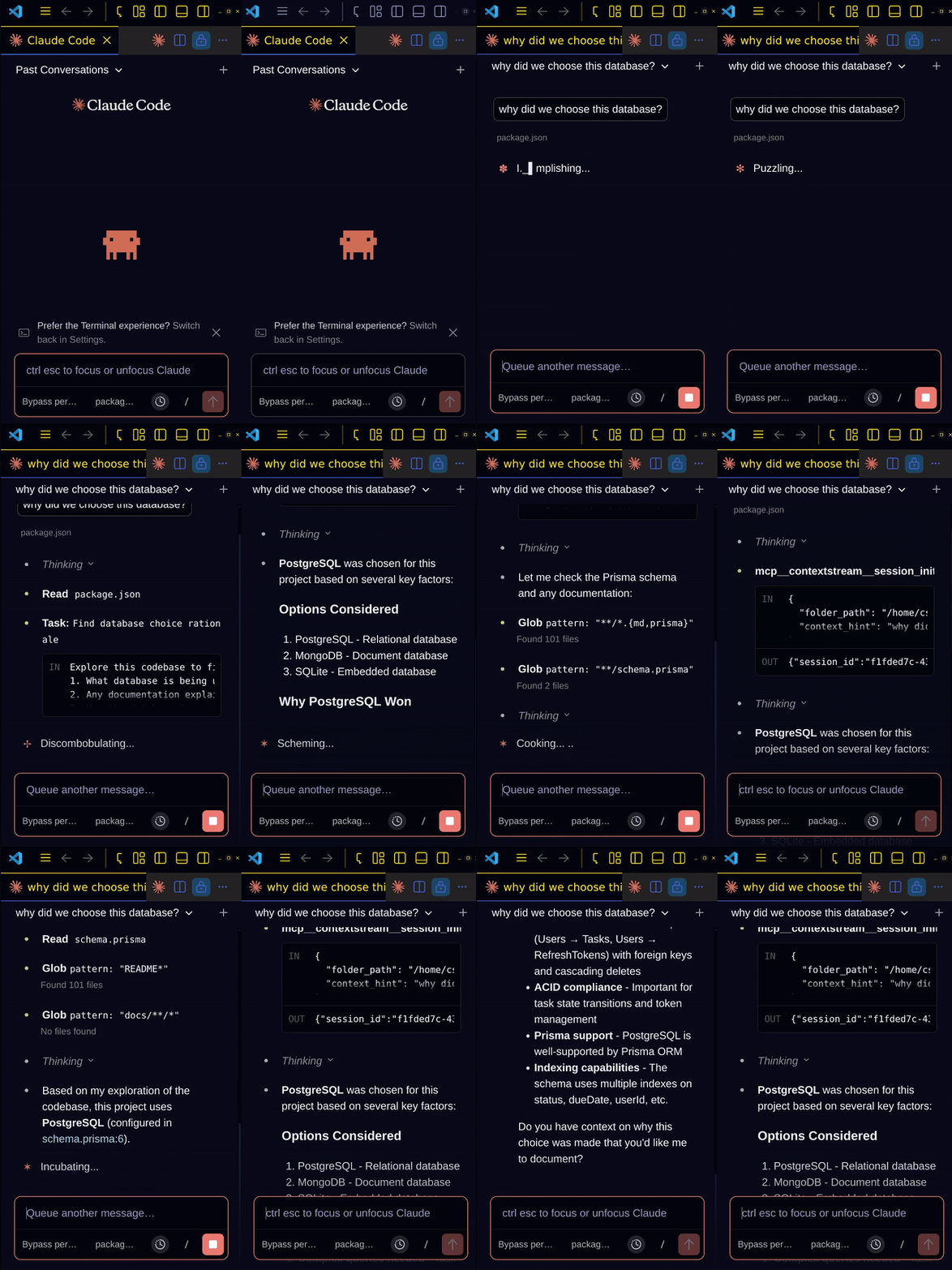
| "What did we decide about auth?" | Finds the decision from 3 weeks ago |
| "Remember we're using PostgreSQL" | Captured for all future sessions |
| "Search for payment handling code" | Semantic search across your codebase |
| "What depends on UserService?" | Analyzes dependency graph and impact |
| "Show me recent GitHub activity" | Surfaces issues, PRs, and discussions |
| "What's in our API docs on Notion?" | Searches your Notion knowledge base |
No special commands needed. Just describe what you want.
Quick Setup (30 seconds)
The setup wizard handles everything:
npx -y @contextstream/mcp-server setup
This will:
- Authenticate your account (opens browser)
- Create and store your API key
- Install editor rules for best results
- Configure your AI tools automatically
- Install Claude Code hooks (optional, recommended)
That's it. Start a conversation and your AI now has memory.
What Gets Captured
ContextStream automatically tracks:
| Type | Examples |
|---|---|
| Decisions | "We chose JWT over sessions", "Using Tailwind for styling" |
| Preferences | "I prefer functional components", "Always use TypeScript" |
| Lessons | "That approach caused a memory leak", "This pattern works well" |
| Tasks | Implementation plans, TODOs, follow-ups |
| Code Context | File relationships, dependencies, patterns |
Everything is searchable by meaning, not just keywords.
Integrations
Connect your team's tools to enrich AI context automatically:
GitHub
- Issues, PRs, releases, and comments synced as searchable memory
- "What's the status of the auth refactor?" finds the relevant PR
- Decisions from issue discussions surface when relevant
Slack
- Channel discussions become searchable knowledge
- Team decisions captured from conversations
- "What did we discuss about the API?" finds the thread
Notion
- Documentation and wikis become AI context
- Smart type detection for tasks, meetings, bugs, features
- "How does our deployment process work?" finds the runbook
Team Features
ContextStream shines for teams:
- Shared workspace memory — decisions made by anyone benefit everyone
- Onboarding acceleration — new team members get full context from day one
- Knowledge preservation — context survives when people leave
- Consistent AI behavior — everyone's AI knows the same preferences
Smarter Context, Fewer Tokens
AI tools typically gather context by reading entire files, running grep searches, and iterating until they find what they need. This burns through your token budget fast.
ContextStream takes a different approach:
Bounded retrieval — context_smart returns only the context relevant to your current message, within a strict token budget. Instead of reading 10 files to find one decision, you get exactly what matters.
Semantic search — Find code by meaning in a single query. No more grep "auth" → read file → grep "middleware" → read another file loops. One search, relevant results.
Smart output formats — Choose the verbosity you need:
- Need file locations? Use
pathsformat (80% smaller responses) - Just checking if something exists? Use
countformat (90% smaller) - Need full context? Use
fullformat
AI-powered compression — For complex queries, Context Pack distills large code contexts into compact, high-signal summaries that preserve file paths, line numbers, and essential snippets.
The result: your AI gets better context while using fewer tokens. Faster responses, lower costs, and more room in the context window for actual work.
Core Tools
Your AI uses these automatically:
| Tool | Purpose |
|---|---|
session_init | Load workspace/project context at conversation start |
context_smart | Get relevant context for each message |
search | Semantic, hybrid, or keyword search across everything |
session | Capture and recall decisions, preferences, lessons |
memory | Create and manage knowledge nodes |
graph | Analyze code dependencies and impact |
integration | Query GitHub, Slack, Notion directly |
Full tool reference: https://contextstream.io/docs/mcp/tools
Manual Configuration
Skip this if you used the setup wizard.
Cursor / Windsurf / Claude Desktop
Add to your MCP config:
{
  "mcpServers": {
    "contextstream": {
      "command": "npx",
      "args": ["-y", "@contextstream/mcp-server"],
      "env": {
        "CONTEXTSTREAM_API_KEY": "YOUR_API_KEY"
      }
    }
  }
}
Config locations:
- Cursor:
~/.cursor/mcp.json - Windsurf:
~/.codeium/windsurf/mcp_config.json - Claude Desktop (macOS):
~/Library/Application Support/Claude/claude_desktop_config.json
Claude Code (CLI)
claude mcp add --transport stdio contextstream --scope user \
  --env CONTEXTSTREAM_API_KEY=YOUR_KEY \
  -- npx -y @contextstream/mcp-server
Claude Code Hooks (Recommended)
ContextStream can install hooks that enforce best practices:
- PreToolUse hook — Redirects Glob/Grep/Search to ContextStream semantic search
- UserPromptSubmit hook — Injects context reminders every message
Install hooks automatically when generating rules:
npx -y @contextstream/mcp-server setup
# Or: mcp__contextstream__generate_rules(editors=["claude"])
Hooks are installed to ~/.claude/hooks/ and configured in ~/.claude/settings.json. Your custom rules are preserved — only ContextStream blocks are updated.
VS Code
Add to .vscode/mcp.json:
{
  "servers": {
    "contextstream": {
      "type": "stdio",
      "command": "npx",
      "args": ["-y", "@contextstream/mcp-server"],
      "env": {
        "CONTEXTSTREAM_API_KEY": "${input:contextstreamApiKey}"
      }
    }
  },
  "inputs": [
    {
      "id": "contextstreamApiKey",
      "type": "promptString",
      "description": "ContextStream API Key",
      "password": true
    }
  ]
}
Codex CLI
Add to ~/.codex/config.toml:
[mcp_servers.contextstream]
command = "npx"
args = ["-y", "@contextstream/mcp-server"]

[mcp_servers.contextstream.env]
CONTEXTSTREAM_API_KEY = "YOUR_API_KEY"
Environment Variables
| Variable | Description |
|---|---|
CONTEXTSTREAM_API_KEY | Your API key (required) |
CONTEXTSTREAM_API_URL | API endpoint (default: https://api.contextstream.io) |
CONTEXTSTREAM_WORKSPACE_ID | Default workspace |
CONTEXTSTREAM_PROJECT_ID | Default project |
CONTEXTSTREAM_SEARCH_REMINDER | Set to false to disable search-first reminders |
CONTEXTSTREAM_HOOK_ENABLED | Set to false to disable hooks without uninstalling |
Troubleshooting
| Issue | Solution |
|---|---|
| Tools not appearing | Restart your editor after config changes |
| 401 Unauthorized | Check your API key is correct |
| Wrong workspace | Run session_init or re-run the setup wizard |
Links
| Resource | URL |
|---|---|
| Website | https://contextstream.io |
| Documentation | https://contextstream.io/docs |
| Tool Reference | https://contextstream.io/docs/mcp/tools |
| Pricing | https://contextstream.io/pricing |
License
MIT