
Pawsome Pet Care - AI-Powered Veterinary Assistant with Asgardeo Authentication
This project demonstrates a sophisticated AI-powered pet care chatbot system that integrates a secured MCP (Model Context Protocol) server with an intelligent LangGraph agent, using Asgardeo as the OAuth2/OIDC provider for authentication and authorization.
🌟 Key Features
- Secure MCP Server with Asgardeo OAuth2 authentication
- Intelligent LangGraph Agent with dynamic context management
- Multi-Pet Context Handling with automatic pet selection logic
- JWT Token Validation with JWKS endpoint integration
- OpenAI Integration for AI-powered pet name suggestions
- RESTful Web Interface with CORS support
- Real-time Chat with conversation memory
Prerequisites
- Python 3.12 or higher
- Asgardeo account and application setup
- OpenAI API key (for pet name suggestions)
- pip (Python package installer)
Project Structure
├── main.py              # FastMCP server with secured endpoints
├── agent.py            # LangGraph agent with dynamic context logic
├── jwt_validator.py    # JWT validation module for Asgardeo tokens
├── index.html          # Web interface for chat
├── .env                # Environment variables configuration
├── requirements.txt    # Python dependencies
└── README.md          # This file
Installation
-
Clone or download this project
-
Create a virtual environment (recommended)
python -m venv .venv source .venv/bin/activate # On Windows: .venv\Scripts\activate -
Install required dependencies
pip install -r requirements.txtKey dependencies include:
fastmcp- Fast MCP server frameworkpython-dotenv- Environment variable managementopenai- OpenAI API integrationpyjwt- JWT token handlinglanggraph- Agent orchestrationlangchain-openai- OpenAI LangChain integrationaiohttp- Async HTTP serverhttpx- HTTP client
-
Configure environment variables
Create a
.envfile in the project root directory:# Asgardeo OAuth2 Configuration ## Asgardeo Configuration ## 1. Create an Asgardeo Application 1. Login to your [Asgardeo](https://asgardeo.io/) account. 2. Navigate to the **Applications** tab and select the **MCP Client Application**. 3. Add your application name and callback URL. ## 2. Get Your Application Credentials
Once the application is created, get both the Client ID and Tenant Name:
-
Client ID: Found in the application's Protocol tab.
-
Tenant Name: Your organization's tenant name (visible in the URL). AUTH_ISSUER=https://api.asgardeo.io/t/
CLIENT_ID= JWKS_URL=https://api.asgardeo.io/t/ /oauth2/jwks OpenAI Configuration
OPENAI_API_KEY=
**Example with actual values:**
```bash
# Asgardeo OAuth2 Configuration
AUTH_ISSUER=https://api.asgardeo.io/t/pawsomepets
CLIENT_ID=abc123xyz789_client_id_from_asgardeo
JWKS_URL=https://api.asgardeo.io/t/pawsomepets/oauth2/jwks

# OpenAI Configuration
OPENAI_API_KEY=sk-proj-abc123xyz789
🔐 Asgardeo Configuration
1. Create an MCP Client Application in Asgardeo
-
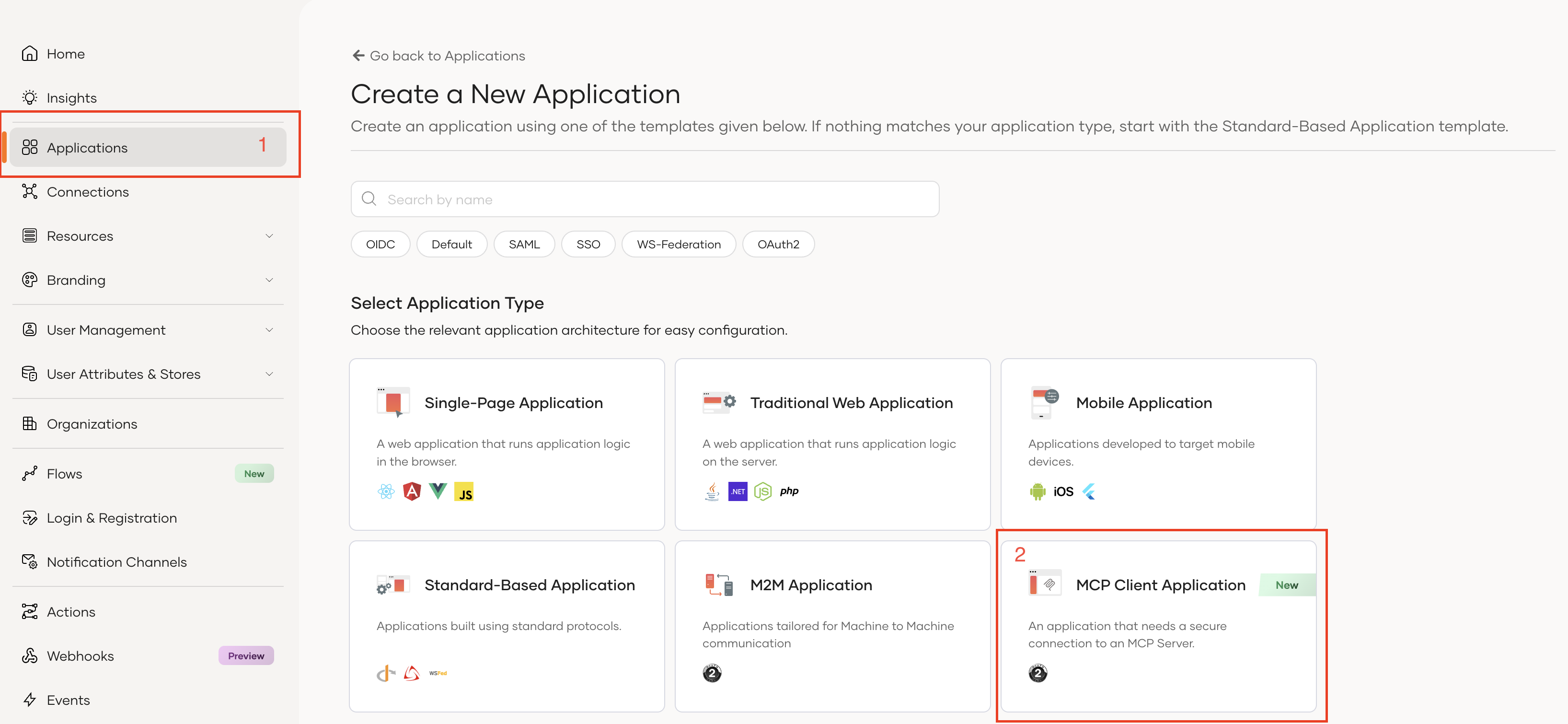
Login to your Asgardeo account at https://console.asgardeo.io
-
Navigate to the Applications tab and select MCP Client Application template
-
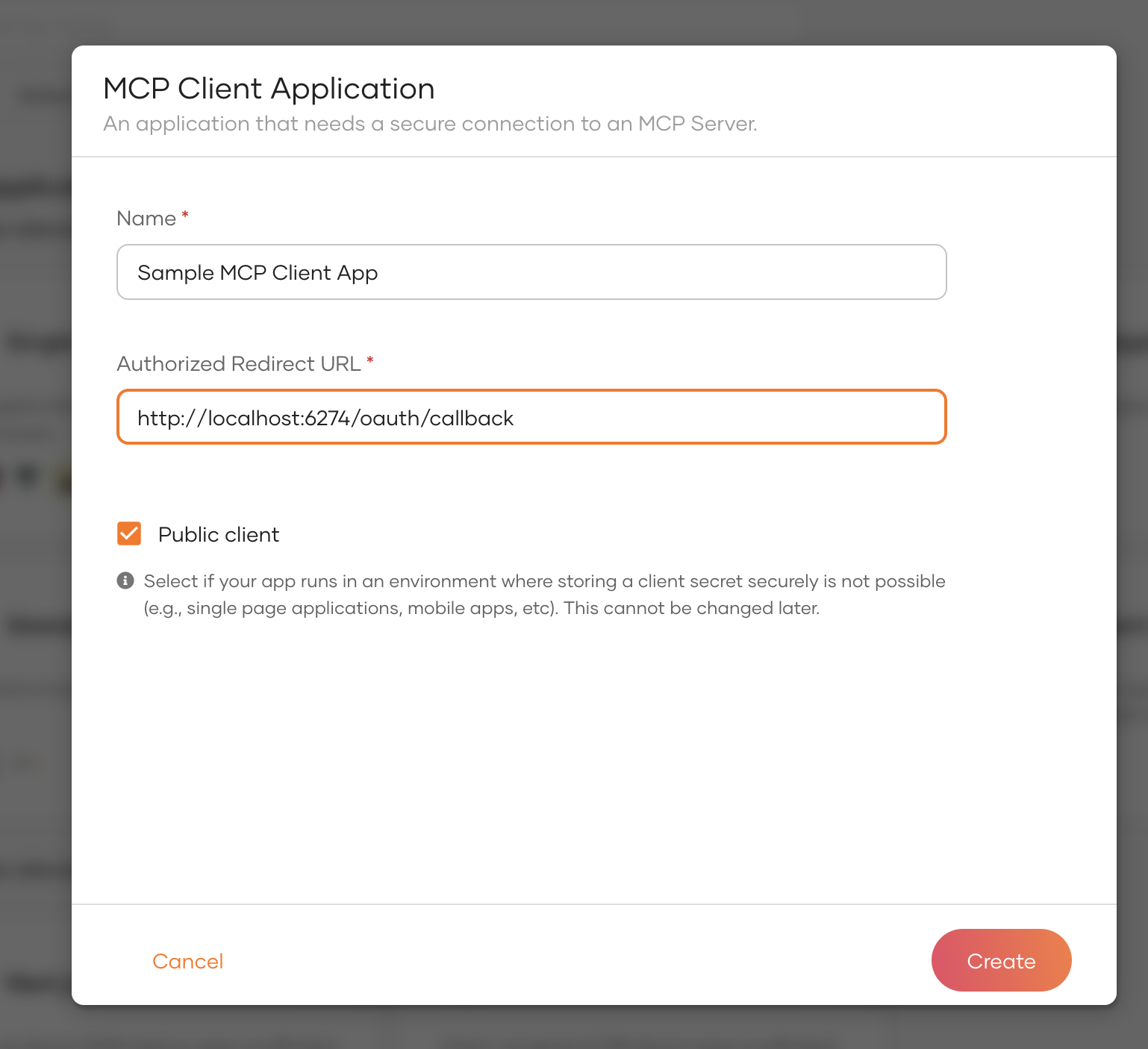
Configure your application:
- Application Name: Pawsome Pet Care MCP
- Authorized Redirect URLs: Add the callback URL for your client application
- For MCP Inspector:
http://localhost:6274/oauth/callback - For the agent:
http://localhost:8080/callback
- For MCP Inspector:
2. Get Your Application Credentials
Once the application is created, retrieve the following:
- Client ID: Found in the application's Protocol tab
- Tenant Name: Your organization's tenant name (e.g.,
pawsomepets)
3. Configure Required Scopes
Ensure your Asgardeo application has the following scopes enabled:
openid- Standard OpenID Connect scopeemail- User email address accessprofile- User profile informationinternal_login- Required for user authentication
4. Update Environment Variables
Replace the placeholders in your .env file:
- Replace
<your-tenant>with your actual Asgardeo tenant name - Replace
<your-client-id>with your OAuth2 client ID from Asgardeo
Security Note: Never commit your .env file to version control. Add .env to your .gitignore file.
Architecture Overview
MCP Server (main.py)
The MCP server provides secured tools for pet management:
-
JWT Token Verification
- Validates incoming tokens using Asgardeo JWKS endpoint
- Extracts user claims (subject, scopes, audience)
- Implements RFC 9728 Protected Resource Metadata
-
Available Tools:
get_user_id_by_email- Retrieves user ID from emailget_pets_by_user_id- Lists all pets for a userget_pet_vaccination_info- Fetches vaccination historybook_vet_appointment- Books veterinary appointmentscancel_appointment- Cancels existing appointmentssuggest_pet_names- AI-powered pet name suggestions via OpenAI
LangGraph Agent (agent.py)
The agent orchestrates intelligent conversations with dynamic context management:
-
Authentication Flow
- Implements OAuth2 Authorization Code Flow with PKCE
- Automatically opens browser for Asgardeo login
- Retrieves user email from ID token and SCIM2/Me endpoint
- Exchanges authorization code for access token
-
State Management
- Maintains conversation history per session
- Caches user context (user ID, pets, active pet)
- Dynamically resolves pet context from user messages
-
Graph Nodes:
load_context- Loads user data at conversation startclassify- Determines user intentmcp_agent- Executes MCP tool calls with dynamic contextgreeting,services,pricing,general- Intent-specific handlers
-
Multi-Pet Logic:
- Single pet: Automatic context selection
- Multiple pets: Detects pet names in messages or asks for clarification
- No pets: Informs user appropriately
Running the System
1. Start the MCP Server
python main.py
The server will start on http://localhost:8000 using streamable-http transport.
2. Start the Agent Server
python agent.py
The agent will:
- Open your browser for Asgardeo authentication
- Wait for authorization callback
- Retrieve your user email
- Start the chat server on
http://localhost:8080
3. Access the Web Interface
Open http://localhost:8080 in your browser to interact with the chatbot.
Testing with MCP Inspector
Setup MCP Inspector
-
Install and run MCP Inspector:
npx @modelcontextprotocol/inspectorNote: Ensure version
0.16.3or higher. -
Configure Inspector Callback:
- Add
http://localhost:6274/oauth/callbackto your Asgardeo application's authorized redirect URLs
- Add
-
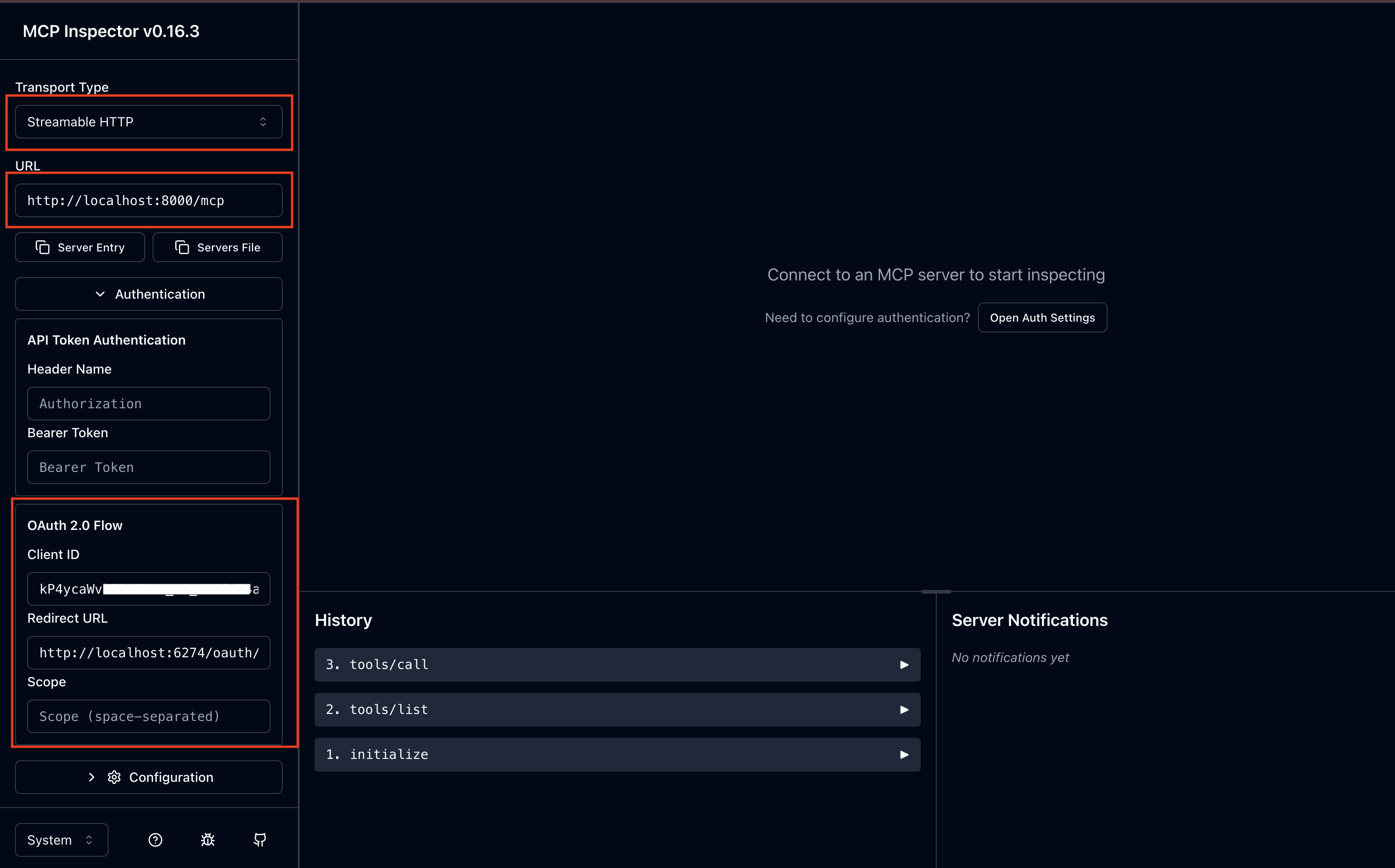
Connect to MCP Server:
- Open the Inspector URL (e.g.,
http://localhost:6274/?MCP_PROXY_AUTH_TOKEN=<token>) - Configure the server connection:
- Transport: HTTP SSE
- URL:
http://localhost:8000/mcp - Auth: OAuth2 with Asgardeo settings
- Open the Inspector URL (e.g.,
-
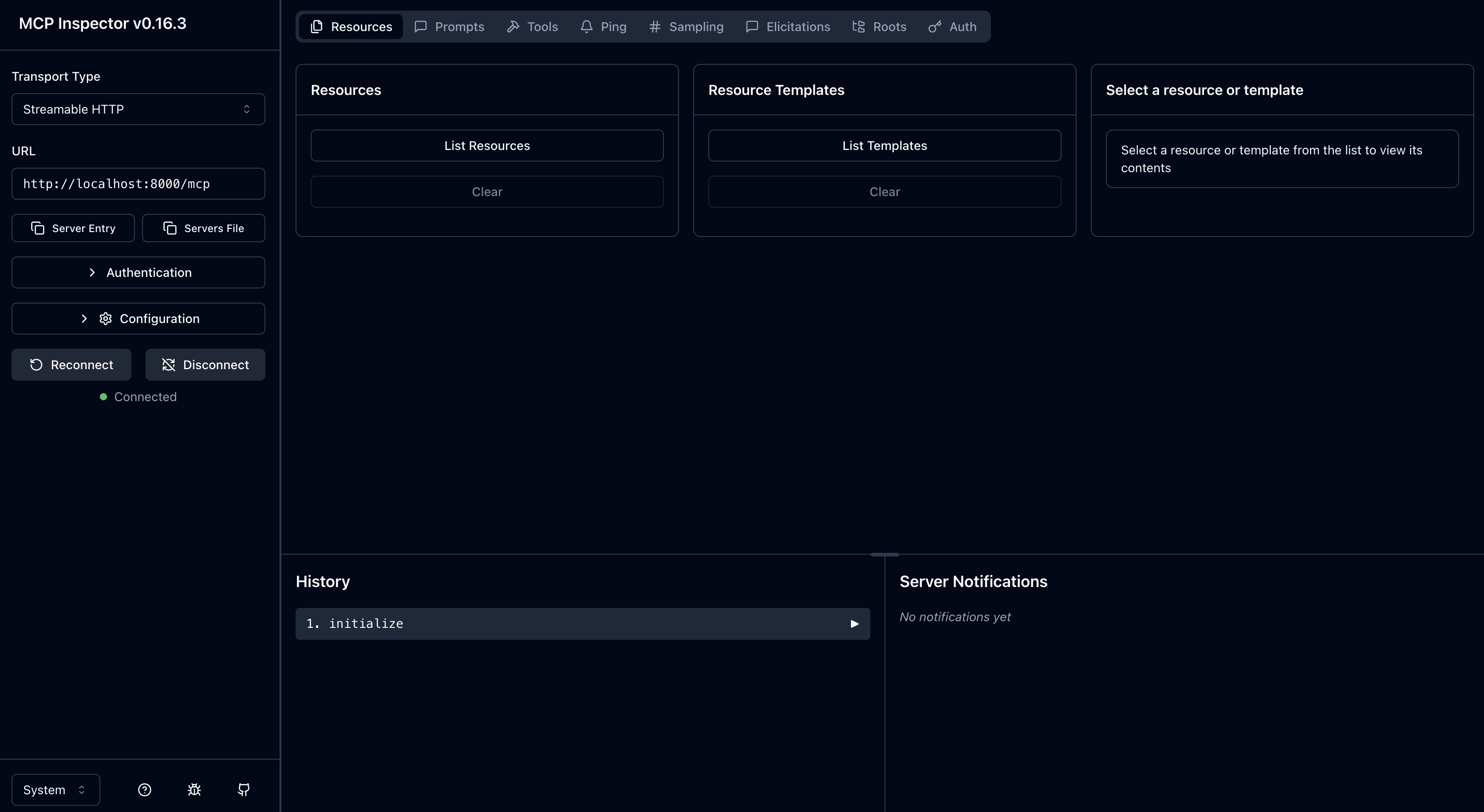
Test Authentication:
- Click Connect
- You'll be redirected to Asgardeo for login
- After successful authentication, you can test the tools
Sample Conversation Flows
Example 1: Single Pet User
User: Hi!
Agent: Welcome back! I've loaded your pet details. How can I help?

User: What are Buddy's vaccinations?
Agent: [Automatically calls get_pet_vaccination_info with Buddy's ID]
       Buddy's vaccination records show:
       - Rabies (Jan 15, 2024) - Next due: Jan 15, 2025
       - DHPP (Mar 20, 2024) - Next due: Mar 20, 2025
       - Bordetella (Jun 10, 2024) - Upcoming: Dec 10, 2024
Example 2: Multiple Pet User
User: Show me vaccination info
Agent: Which pet are you referring to? You have:
       - Buddy (Dog)
       - Spot (Dog)

User: Buddy
Agent: [Calls get_pet_vaccination_info with Buddy's ID]
       [Returns vaccination details...]
Example 3: Booking Appointment
User: Book an appointment for Buddy next Monday at 2 PM for checkup
Agent: [Calls book_vet_appointment]
       Appointment confirmed!
       - Pet: Buddy
       - Date: 2025-11-24
       - Time: 2:00 PM
       - Reason: Checkup
       - Veterinarian: Dr. Smith
Security Features
-
JWT Token Validation
- Validates tokens against Asgardeo JWKS endpoint
- Verifies issuer, audience, and expiration
- Extracts and validates scopes
-
Authorization Flow
- OAuth2 Authorization Code Flow with PKCE
- Secure token exchange
- No client secret required (PKCE protects public clients)
-
Scope-Based Access Control
- Tools require valid access tokens
- Future enhancement: Scope-specific tool access
-
User Context Isolation
- Each user sees only their own pets
- Session-based conversation memory
- Context caching per session ID
Troubleshooting
Email Not Retrieved from ID Token
The agent includes fallback logic to retrieve email from SCIM2/Me endpoint if not present in ID token:
# Fallback to SCIM2/Me endpoint
scim_url = f"{base_url}/scim2/Me"
scim_resp = await client.get(
    scim_url,
    headers={"Authorization": f"Bearer {access_token}"}
)
Token Validation Failures
Check the following:
- JWKS URL is correct and accessible
- Issuer URL matches exactly (including tenant)
- Client ID is correct
- Token has not expired
Connection Issues
- Ensure MCP server is running on
http://localhost:8000 - Verify agent server is running on
http://localhost:8080 - Check firewall settings for local ports
Advanced Configuration
Custom Port Configuration
Modify port settings in the respective files:
MCP Server (main.py):
mcp.run(transport="streamable-http", port=8000)
Agent Server (agent.py):
site = web.TCPSite(runner, 'localhost', 8080)
Adding New Tools
To add new MCP tools:
- Define the tool in
main.py:
@mcp.tool()
async def my_new_tool(param: str) -> dict:
    """Tool description"""
    # Implementation
    return {"result": "data"}
- The agent will automatically discover and use the new tool.
Contributing
Contributions are welcome! Please ensure:
- Code follows PEP 8 style guidelines
- All new tools include proper authentication checks
- Documentation is updated for new features
License
This project is provided as-is for demonstration purposes.
Powered by Asgardeo - Enterprise-grade identity and access management for modern applications.